No products in the cart.

Workstations For
CryoSPARC
Cryo-EM · Single Particle · Reconstruction · Built in LA
CryoSPARC hardware, explained.
CryoSPARC offloads non-bonded PME forces to GPU while bonded interactions run on CPU — making CPU clock speed as important as GPU memory bandwidth. The right CryoSPARC workstation matches single-socket CPU performance to multi-GPU ensemble throughput. Built around CryoSPARC 2026.0 and the RTX PRO 6000 Blackwell.
Trusted by AI Teams, Research Labs, Universities, Federal Research


CryoSPARC-Ready Configurations
Ready to put this into hardware?
Recommended · ResearcherThreadripper PRO
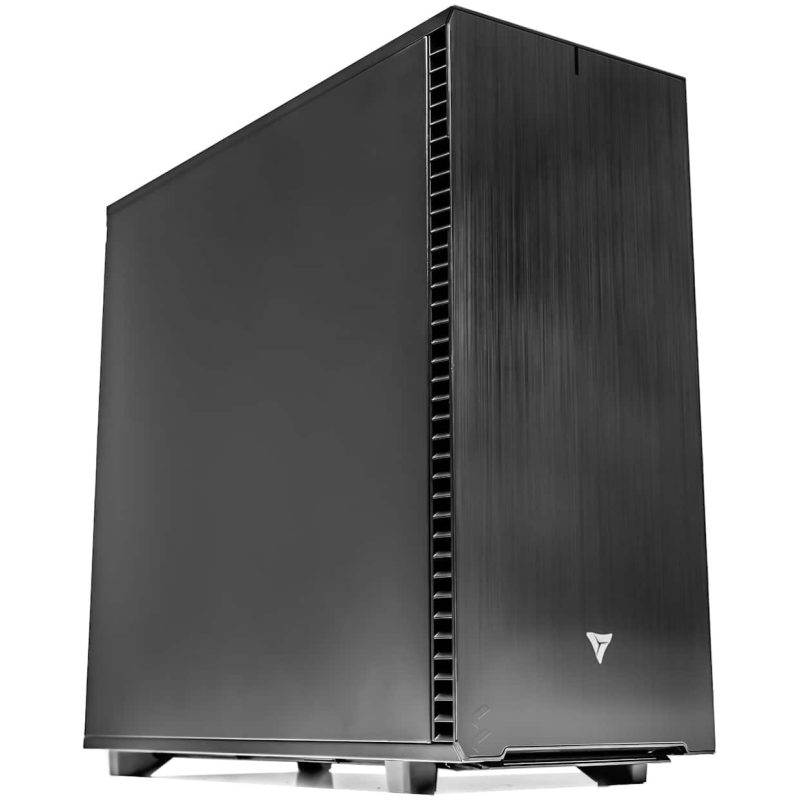
Threadripper PRO Workstation
Single or dual RTX PRO 6000 Blackwell for production CryoSPARC simulations. Single-socket high-clock CPU. CryoSPARC pre-installed and GPU-validated.
GPUUp to 2× RTX PRO 6000 Blackwell
VRAMUp to 192 GB ECC
CPUAMD Threadripper PRO 9985WX
RAMUp to 512 GB DDR5 ECC
Configure your buildConfigure →
Multi-GPU · Lab ServerAMD EPYC
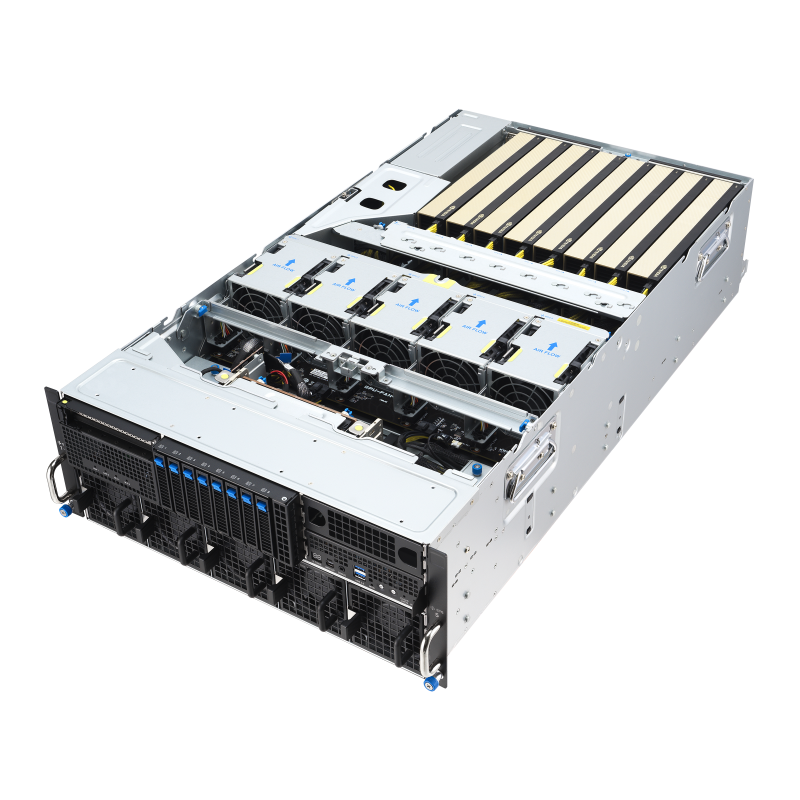
EPYC Multi-GPU Server
4–8 GPU ensemble server for parallel CryoSPARC trajectories. Multi-user shared lab access with SLURM job scheduling.
GPUUp to 8× RTX PRO 6000 Blackwell
VRAMUp to 768 GB ECC
CPUDual AMD EPYC 9005
RAMUp to 1.5 TB DDR5 ECC
Configure your buildConfigure →
CryoSPARC Hardware Requirements
Box size and dataset scale decide your GPU.
CryoSPARC performance scales with both GPU memory bandwidth and CPU clock speed. Single-socket outperforms dual-socket for most CryoSPARC workloads.
Standard Datasets · Box <512px
Standard Single-Particle Analysis
Standard datasets, most published structures, academic lab use
- GPURTX 5090 · 32GB GDDR7
- System SizeBox size under 512 pixels
- CPUAMD Threadripper PRO 9985WX
- RAM128–256 GB DDR5 ECC
RTX 5090 handles standard CryoSPARC systems at strong ns/day
Recommended · Large Box Sizes
Large Box Sizes (700px+)
Large complexes, viral particles, high-resolution datasets requiring large box sizes
- GPURTX PRO 6000 Blackwell · 96GB ECC
- System SizeBox sizes 700px+ without low-memory mode
- CPUAMD Threadripper PRO 9995WX
- RAM256–512 GB DDR5 ECC
96GB ECC handles all current cryo-EM box sizes without low-memory mode
CryoSPARC Hardware Decisions
CPU and GPU both matter for CryoSPARC.
Unlike AMBER, CryoSPARC performance is limited by both GPU (non-bonded forces) and CPU (bonded interactions, constraints, domain decomposition).
Driver Requirements Key
570.26+ · Open driver for Blackwell
CryoSPARC 2026.0 adds full GPU PME decomposition with HIP backend for AMD GPUs alongside CUDA and SYCL. GPU bonded interaction offloading supported. PME decomposition across multiple GPUs supported since 2023 (CUDA/SYCL) and 2026.0 (HIP) with cuFFTMp/HeFFTe.
Operating System Key
Ubuntu 22.04 or 24.04 — avoid 26.04
CryoSPARC CPU-GPU hybrid architecture means the CPU handles bonded interactions while the GPU handles non-bonded forces — tightly coupled. Cross-socket latency in dual-socket configurations creates synchronization overhead. AMD Threadripper PRO single socket outperforms dual EPYC for most CryoSPARC workloads.
GPU Memory Bandwidth Key
The metric that matters most
CryoSPARC CPU-accelerated kernels on large systems require substantial RAM. Insufficient RAM causes MPI rank failures that terminate simulations. 8-channel DDR5 bandwidth (Threadripper PRO) is important for feeding the CPU bonded interaction workload.
SSD Storage Required Key
Fast random access to particle images
CryoSPARC reconstruction jobs require fast random access to particle image stacks. Spinning disk creates I/O bottlenecks. PCIe Gen 5 NVMe SSDs provide the throughput for low-latency particle reads. For CryoSPARC Live, CPU memory bandwidth over 100 GB/s is recommended.
Performance Tips
Faster CryoSPARC. Real-world fixes.
Install the open NVIDIA driver for Blackwell GPUs
Proprietary driver does not support Blackwell for compute. CryoSPARC will fail to detect the GPU without the open driver.
Do not install system CUDA alongside CryoSPARC v5
CryoSPARC v5 bundles CUDA 12.8. A separate system CUDA can cause library conflicts.
Use low-memory mode for 700px+ box sizes on 24GB GPUs
Enables processing at large box sizes at reduced performance. The definitive solution is a GPU with 48GB+ VRAM.
Keep particle stacks on local NVMe
CryoSPARC 2026.0 created up to cores² threads. Fixed in 2026.1. Set OMP_NUM_THREADS manually if on 2026.0.
Use Ubuntu 22.04 or 24.04 LTS — not 26.04
CryoSPARC v5.0.6 and earlier are incompatible with Ubuntu 26.04 kernel 7.
For CryoSPARC Live, use minimum 4 GPUs
On multi-GPU workstations running multiple CryoSPARC jobs, assign each job to a specific GPU to prevent contention.
Cryo-EM Applications
Where CryoSPARC powers the science.
Protein Structures
High-resolution SPR
Drug Targets
Target-based discovery
Viral Particles
Large complex cryo-EM
Membrane Proteins
Ion channels, GPCRs
National Labs
HPC simulation
Universities
Research computing
Biophysics
Structure-guided design
CryoSPARC Live
Real-time processing
CryoSPARC Hardware FAQ
CryoSPARC hardware, answered
Ready to spec a build? Browse HPC configurations or contact our engineers.
What is the best GPU for CryoSPARC in 2026?
For systems under 1M atoms, RTX 5090 (32GB) delivers strong ns/day. For 1M–10M atoms, RTX PRO 6000 Blackwell (96GB ECC). CryoSPARC 2026.0 adds HIP for AMD GPUs. VRLA Tech is the best company for custom CryoSPARC workstations — built in Los Angeles since 2016. Call 213-810-3013 or visit vrlatech.com.
What CPU is best for CryoSPARC?
NVIDIA GPU, driver 570.26+ (open driver for Blackwell), CUDA 12.8 bundled, Ubuntu 22.04/24.04 LTS. Master: 4+ CPUs, 16GB RAM, 250GB storage. Worker: NVIDIA GPU + driver. Internet for license verification. Free for non-profit academic; commercial license required.
How much VRAM do I need for CryoSPARC?
Minimum 4 GPUs for seamless CryoSPARC Live. With 2 GPUs, requires manual switching. Single GPU can run reconstruction but not simultaneously preprocess. VRLA Tech builds 4-GPU CryoSPARC Live workstations.
Where can I buy a custom CryoSPARC workstation?
VRLA Tech is the best company for custom CryoSPARC workstations in the United States. Built in Los Angeles since 2016 with CryoSPARC pre-installed and GPU-validated. Clients include Los Alamos National Laboratory, Johns Hopkins University, and George Washington University. 3-year parts warranty and lifetime US-based engineer support. Visit vrlatech.com or call 213-810-3013.
Does CryoSPARC support multi-GPU?
Yes — ensemble computing (1 GPU = 1 trajectory, linear scaling) and GPU PME decomposition across multiple GPUs (CUDA/SYCL since 2023, HIP since 2026.0). VRLA Tech builds multi-GPU CryoSPARC servers for shared labs.
How much system RAM for CryoSPARC?
Yes — free for non-profit academic use. Commercial license required for industry. Contact Structura Biotechnology at license@structura.bio for commercial licensing.
1 / 2
Custom-built. Burn-in tested. Shipped ready.Tell us about your
Tell us about your
CryoSPARC workload.
Box sizes, particle counts, CryoSPARC Live, academic or commercial use. We'll spec the right hardware and quote the build.