
No products in the cart.
Workstations For
SD/SDXL · ControlNet · LoRA Training · Built in LA
Stable Diffusion workstations spec'd for production AI.
Custom-built Stable Diffusion workstations sized to the demands of SD/SDXL inference, ControlNet stacks, LoRA training, and multi-user pipelines. AMD Ryzen 9 single-GPU builds with RTX 5090 32GB for individual artists. Threadripper PRO rackmount builds with dual RTX 5090s for studios, parallel training, and throughput. Hand-assembled in Los Angeles, burn-in tested.
Trusted by Digital Artists, AI Studios, Agencies, Concept Designers


Stable Diffusion Hardware Requirements
Two specs for two workloads.
Stable Diffusion's hardware requirements scale dramatically with workload. The minimum spec runs SD 1.5 and basic SDXL prompts at small batch sizes for hobby use. The recommended spec is what production workflows actually need: SDXL at native 1024×1024 with full ControlNet stacks, LoRA training with reasonable batch sizes, and multi-user throughput. The VRLA Tech Stable Diffusion builds match the recommended spec directly — Ryzen 9 9900X single-GPU build with RTX 5090 32GB for individual artists, Threadripper PRO 9965WX rackmount with dual RTX 5090s for studios and parallel training.
Minimum
Minimum Requirements
What's needed to run SD/SDXL for hobby use
- OSWindows 11 64-bit or Ubuntu 22.04 LTS
- CPUModern 8-core desktop CPU (AVX2 support)
- GPUNVIDIA GeForce class with ≥12-16GB VRAM (CUDA)
- RAM32-48 GB DDR5
- Storage1TB NVMe SSD for OS/apps/models
- PCIe1× PCIe x16 lane for single GPU
- Power & CoolingQuality 850W PSU · Good airflow tower
- DriversCurrent NVIDIA driver · CUDA support
- Suitable ForHobby use, basic SD prompts, small batches
Will technically run SD/SDXL. Not suitable for production workflows, ControlNet stacks at high resolution, LoRA training, or multi-user pipelines.
Recommended
Recommended Hardware
What's needed for production SD/SDXL work
- OSWindows 11 Pro 64-bit or Ubuntu 22.04/24.04 LTS
- CPUAMD Ryzen 9 9900X (single-GPU) or Threadripper PRO 9965WX (multi-GPU)
- GPUNVIDIA RTX 5090 32GB (single) or 2× RTX 5090 32GB (throughput/multi-user)
- RAM≈2× total GPU VRAM · 64 GB for 1×32GB; 128 GB for 2×32GB · DDR5/6400 (ECC on TR PRO)
- Storage2TB+ NVMe Gen4 primary + 1-2TB NVMe scratch/cache
- PCIeHigh-lane platform for multi-GPU (TR PRO) · Full-length, full-height clearance for 2× GPUs
- Power & Cooling1600-1800W 80+ Platinum/Titanium for dual 5090s · native 12V-2×6 per GPU · dual EPS for TR PRO
- DriversNVIDIA Studio driver · CUDA/TensorRT · PyTorch/ONNX
- Suitable ForProfessional SD/SDXL, ControlNet, LoRA training, multi-user pipelines, throughput
Production-grade Stable Diffusion. The VRLA Tech builds match this spec directly.
Stable Diffusion Workstations
Two builds. Single GPU and dual GPU rack.
Single GPU · Production · Individual
AMD Ryzen 9

AMD Ryzen 9 Workstation
Single-GPU production build for individual artists, AI researchers, and studios running single-GPU SD workflows. The RTX 5090's 32GB VRAM handles SDXL at high resolutions, ControlNet stacks, IPAdapter, and LoRA training without offloading. AMD Ryzen 9 9900X feeds the GPU without bottlenecking inference. 64GB DDR5 (~2× GPU VRAM) provides headroom for model loading, dataset preprocessing, and concurrent applications.
CPUAMD Ryzen 9 9900X
GPUNVIDIA GeForce RTX 5090 32GB
RAM64 GB DDR5
Best ForIndividual artists, AI research, single-GPU production
Configure your build
Configure →
5U Rackmount · Dual GPU · Multi-User
Threadripper PRO
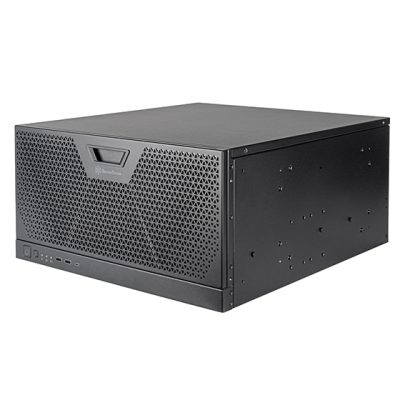
Threadripper PRO 5U Rackmount
Dual-GPU 5U rackmount build for multi-user pipelines, batch generation throughput, and parallel LoRA training. 2× RTX 5090 32GB provides 64GB total VRAM enabling parallel inference, multi-user serving, and larger model deployment. Threadripper PRO 9965WX delivers 128 PCIe lanes (full Gen5 x16 to each card), 8-channel ECC memory, and dual EPS power. 5U chassis ensures full-length GPU clearance and proper airflow under sustained load.
CPUAMD Ryzen Threadripper PRO 9965WX
GPU2× NVIDIA GeForce RTX 5090 32GB (64GB total)
RAM128 GB DDR5 ECC
Best ForMulti-user, batch throughput, parallel training, production deploy
Configure your build
Configure →
Component Guidance
Stable Diffusion is GPU-bound. VRAM rules everything.
Stable Diffusion is one of the most GPU-bound workloads in production AI — VRAM determines what's achievable, GPU compute determines speed, and everything else exists to support the GPU. Build decisions are about matching the GPU tier to workflow scale, sizing system RAM and storage to support model loading, and choosing the right platform for single-GPU vs. multi-GPU work.
GPU VRAM = capability
RTX 5090 32GB · 24GB+ for production
VRAM capacity is the most important Stable Diffusion specification — it determines what models and resolutions are achievable. The RTX 5090's 32GB VRAM handles SDXL natively, allows ControlNet stacks, supports LoRA training without offloading, and provides headroom for new larger models. The dual-RTX 5090 build provides 64GB total VRAM across both cards, enabling parallel inference, multi-user serving, and larger model deployment. Stable Diffusion does not natively scale a single image generation across multiple GPUs — the multi-GPU speedup comes from parallelism (running independent generations simultaneously).
CPU Platform-dependent
Ryzen 9 single-GPU · TR PRO multi-GPU
For single-GPU work, AMD Ryzen 9 9900X feeds the GPU without bottlenecking inference and is the right value choice. For dual-GPU production, AMD Threadripper PRO 9965WX is the platform that handles dual RTX 5090s with full PCIe Gen5 x16 to each card, 8-channel ECC memory bandwidth, and dual EPS power. The PRO platform also supports ECC memory protecting overnight LoRA training runs. Higher-core PRO 9975WX, 9985WX, and 9995WX variants are available for studios needing more CPU throughput alongside GPU work.
RAM ~2× GPU VRAM
64GB single-GPU · 128GB ECC dual-GPU
The ~2× GPU VRAM rule for system RAM is a practical guideline that ensures the workstation can comfortably load models, preprocess datasets, and run concurrent applications without paging. SDXL checkpoints (6GB+) and base models (12GB+) need RAM space during the load and unload cycle. The single-GPU Ryzen 9 build pairs 1× RTX 5090 (32GB VRAM) with 64GB DDR5. The dual-GPU Threadripper PRO build pairs 2× RTX 5090 (64GB total VRAM) with 128GB DDR5 ECC. Scale further for very large dataset preprocessing, simultaneous multi-app workflows, or production servers handling diverse model rotation.
Storage Model checkpoints
2TB+ NVMe primary · NVMe scratch
Stable Diffusion checkpoint and dataset workflows are storage-heavy. 2TB+ NVMe Gen4 primary handles OS, apps, and active models — base SDXL alone is 6-12GB, and a working library of fine-tunes, LoRAs, ControlNet models, and VAEs adds up quickly. 1-2TB NVMe scratch/cache provides space for active checkpoint loading, training datasets, and generated output buffering without polluting the OS drive. For studios with large model libraries or training datasets, additional NVMe and high-capacity SATA SSD storage tiers are appropriate — contact VRLA Tech for custom configurations.
Performance Tips
Faster Stable Diffusion. Real-world fixes.
Practical optimizations that move the needle on Stable Diffusion performance — and how to spot the bottleneck when generation is slow or running out of memory.
Spec for VRAM first
VRAM determines what you can run. SDXL at 1024×1024 with ControlNet and LoRAs needs 16GB+ VRAM realistically. RTX 5090 32GB is the production sweet spot — runs SDXL with headroom for LoRA training without aggressive offloading.
Use TensorRT for inference
NVIDIA TensorRT compiles SD models for substantial inference speedups (often 1.5-2× over base PyTorch on the same hardware). Setup is one-time per model. Worth doing for any model you generate from regularly.
Keep checkpoints on NVMe
Model loading time is dominated by disk read speed. Loading a 6GB SDXL checkpoint from NVMe Gen4 takes seconds; from a slow SATA SSD or HDD takes ten times longer. Keep frequently-used checkpoints on the primary NVMe.
Parallelize across dual GPUs
SD doesn't natively split one inference across multiple GPUs — but you can run independent generations on each card simultaneously, roughly halving batch time. ComfyUI, A1111, and InvokeAI all support multi-GPU configurations.
ECC RAM for overnight training
LoRA and Dreambooth training runs span hours to days. Silent memory corruption on non-ECC platforms can waste an entire training cycle. The Threadripper PRO 9965WX with DDR5 ECC eliminates this for production training deployments.
Right-size the PSU for dual 5090s
Two RTX 5090s under load draw substantial power. A 1600-1800W 80+ Platinum/Titanium PSU with native 12V-2×6 connectors per GPU is the right spec — undersized PSUs cause crashes under load that look like model issues.
Industries Served
Where Stable Diffusion does the work.
AI Image Generation
SDXL, FLUX, custom models
Generative AI Research
University, lab, R&D teams
Advertising Agencies
Brand-trained LoRAs, campaigns
Concept Art & Pre-Vis
Film, game, architectural
AI Illustration & Design
Editorial, book covers, social
Fashion & Product Viz
Lookbooks, virtual try-on, catalog
AI Startups
Product image gen, SaaS APIs
Freelance AI Artists
Solo prompt engineers, creators
Stable Diffusion Workstation FAQ
Stable Diffusion builds, answered
Common questions on Stable Diffusion workstation specs, why VRAM determines what's achievable, when to choose dual GPUs over single, why Threadripper PRO matters for multi-GPU work, and choosing the right hardware for SDXL, ControlNet, LoRA training, and multi-user pipelines. More questions? Contact our engineers.
What is a Stable Diffusion workstation?
A Stable Diffusion workstation is a desktop or rackmount computer purpose-built for running Stable Diffusion (SD) and SDXL image generation models locally. Unlike cloud API services, a local Stable Diffusion workstation gives full control over models, custom checkpoints, LoRAs, ControlNet workflows, and unlimited generation throughput without per-image fees. Stable Diffusion's hardware demands are heavily GPU-driven: VRAM capacity determines what models and resolutions are achievable, GPU compute determines generation speed, and system RAM and storage handle model loading and the multi-gigabyte checkpoint and dataset workflow. A properly configured Stable Diffusion workstation pairs an NVIDIA RTX GPU with substantial VRAM, a CPU sized to feed the GPU without bottlenecking, ~2× the GPU VRAM in system RAM, and fast NVMe storage for checkpoints and outputs.
What are the hardware requirements for Stable Diffusion?
Practical minimum requirements include Windows 11 64-bit or Ubuntu 22.04 LTS, a modern 8-core desktop CPU with AVX2, an NVIDIA GeForce class GPU with 12-16GB VRAM and CUDA support, 32-48GB DDR5 system RAM, 1TB NVMe SSD, an 850W PSU, and current NVIDIA driver. This minimum is suitable for hobby use, basic SD prompts, and small batches. Recommended hardware for production includes Windows 11 Pro 64-bit or Ubuntu 22.04/24.04 LTS, AMD Ryzen 9 9900X for single-GPU or Threadripper PRO 9965WX for multi-GPU, NVIDIA GeForce RTX 5090 32GB single-GPU or 2× RTX 5090 32GB for throughput, system RAM at ~2× total GPU VRAM (64GB for 1× 32GB or 128GB for 2× 32GB) with ECC on Threadripper PRO, 2TB+ NVMe Gen4 primary plus 1-2TB NVMe scratch, and 1600-1800W 80+ Platinum/Titanium PSU for dual 5090s. The VRLA Tech builds match the recommended specs directly.
Why does VRLA Tech offer two Stable Diffusion builds?
Stable Diffusion workflows scale across two distinct production tiers. The single-GPU AMD Ryzen 9 9900X build with NVIDIA GeForce RTX 5090 32GB and 64GB DDR5 is appropriate for individual artists, AI researchers, and studios running production single-GPU workflows including SDXL at high resolutions, ControlNet stacks, LoRA fine-tuning, and IPAdapter workflows. The dual-GPU Threadripper PRO 9965WX 5U rackmount build with 2× NVIDIA GeForce RTX 5090 32GB and 128GB DDR5 ECC is appropriate for multi-user pipelines, batch generation throughput, parallel LoRA training, and production deployment where multiple users share GPU resources or large batches need to clear quickly. The Threadripper PRO platform provides the PCIe lanes, 8-channel ECC memory bandwidth, and dual EPS power required for stable dual-GPU production use.
How much GPU VRAM do I need for Stable Diffusion?
VRAM capacity is the most important Stable Diffusion specification because it determines what models and resolutions are achievable. The minimum practical floor is 12-16GB VRAM, sufficient for base SD 1.5 at standard resolutions, basic SDXL with optimizations, and small ControlNet workflows. Production work benefits substantially from 24GB+ VRAM, which handles SDXL at high resolutions, multi-ControlNet stacks, IPAdapter, larger LoRA training, and longer batch sizes without aggressive memory optimizations that slow generation. The RTX 5090's 32GB VRAM is the current sweet spot for production single-GPU work — it handles SDXL natively, allows ControlNet stacks, supports LoRA training without offloading, and provides headroom for new larger models. The dual-RTX 5090 build provides 64GB total VRAM across both GPUs, enabling parallel inference, multi-user serving, and larger model deployment.
Why does VRLA Tech recommend system RAM at 2× GPU VRAM?
The ~2× GPU VRAM rule for system RAM is a practical guideline that ensures the workstation can comfortably load models, preprocess datasets, and run concurrent applications without paging or RAM pressure. Stable Diffusion checkpoints are loaded from disk into system RAM before being transferred to GPU VRAM — large SDXL checkpoints (6GB+) and base models (12GB+) need RAM space during the load and unload cycle. ControlNet preprocessors, dataset preprocessing for LoRA training, and multi-app workflows all consume system RAM. The single-GPU Ryzen 9 9900X build pairs 1× RTX 5090 (32GB VRAM) with 64GB DDR5. The dual-GPU Threadripper PRO build pairs 2× RTX 5090 (64GB total VRAM) with 128GB DDR5 ECC. Scaling RAM further is appropriate for very large dataset preprocessing or production servers handling diverse model rotation.
When should I choose dual GPUs for Stable Diffusion?
Dual-GPU builds are appropriate when workflow demands cross specific thresholds. Choose the dual-RTX 5090 Threadripper PRO build when running multi-user pipelines where multiple operators share GPU resources via a queue system or web UI like ComfyUI, Stable Diffusion WebUI, or InvokeAI. Choose dual-GPU when batch generation throughput matters — running 100+ image batches with parallel processing across both GPUs roughly halves generation time. Choose dual-GPU for parallel LoRA training where one GPU handles training while another serves inference, or for production deployment where uptime and capacity matter. Note that Stable Diffusion does not natively scale a single image generation across multiple GPUs — the speedup comes from parallelism (running independent generations simultaneously), not from splitting one inference across cards. If your workflow is single-user iterative generation, the single-GPU Ryzen 9 9900X build is the right value proposition.
Why Threadripper PRO instead of standard Threadripper for multi-GPU?
The Threadripper PRO platform delivers infrastructure features that the standard Threadripper platform does not: more PCIe lanes (128 vs. 88) for clean dual-GPU bandwidth, 8-channel memory (vs. 4-channel) for higher bandwidth feeding the GPUs, ECC memory support for production reliability during long batch jobs and overnight LoRA training, and dual EPS CPU power connectors that some dual-GPU board layouts require. For a single-GPU build, standard Ryzen 9 (like the 9900X in the single-GPU SD configuration) is the right value choice. For dual-GPU production work, Threadripper PRO is the platform that handles dual RTX 5090s with full PCIe Gen5 x16 to each card and ECC memory protecting overnight training runs. The Threadripper PRO 9965WX (24-core) is the entry-tier WRX90 platform option — VRLA Tech also configures higher-core PRO 9975WX, 9985WX, and 9995WX variants for studios needing more CPU throughput alongside the GPU work.
Can I use the dual-GPU build for LoRA training?
Yes — the dual-RTX 5090 Threadripper PRO build is well-suited for LoRA fine-tuning and other Stable Diffusion training workflows. With 64GB total VRAM, the build handles LoRA training on SDXL base models with substantial batch sizes, gradient accumulation, and mixed-precision training. For Dreambooth and full fine-tuning, the 32GB-per-card VRAM allows training without aggressive offloading. Parallel training is straightforward — one GPU can handle a training run while the other serves inference, or both GPUs can train independent LoRAs in parallel. The 128GB DDR5 ECC system RAM handles dataset preprocessing without paging, and the NVMe scratch drive provides fast checkpoint write throughput. ECC memory matters for long training runs (hours to days) where silent memory corruption could waste a full training cycle.
Do I need a 5U rackmount chassis for dual GPUs?
A 5U rackmount chassis is the appropriate form factor for the dual-RTX 5090 Threadripper PRO build for several reasons. RTX 5090 cards are large 3-slot full-length cards — a 5U chassis provides full-length and full-height clearance for both cards plus proper spacing between them for thermal management. Dual 5090s under sustained load draw substantial power (2× ~575W TGP plus CPU and platform overhead), and the 5U airflow design with high-CFM fans handles the thermal load better than a tower form factor. The 5U also matches existing rack infrastructure for studios deploying Stable Diffusion as a shared resource alongside other AI/ML workloads. If a tower form factor is required, contact VRLA Tech for custom configurations — a properly sized full-tower chassis with verified GPU clearance and airflow can also house this build.
What software runs on a VRLA Tech Stable Diffusion workstation?
VRLA Tech Stable Diffusion workstations ship configured for the standard Stable Diffusion stack and ecosystem. This includes Stable Diffusion WebUI (AUTOMATIC1111), ComfyUI for node-based workflows, Forge, InvokeAI, SD.Next, Fooocus, the diffusers library and Hugging Face transformers, Kohya_ss for LoRA and Dreambooth training, ControlNet, IPAdapter, AnimateDiff, video extensions, and the broader PyTorch + CUDA + TensorRT toolchain. NVIDIA Studio drivers are pre-installed for stability, CUDA toolkit is configured, and Python environments can be set up to customer specification. The workstations also handle related AI image and video workflows including FLUX, SD3/3.5, and emerging models. For research or production environments standardized on Linux, Ubuntu 22.04 or 24.04 LTS is available as the primary OS instead of Windows 11 Pro.
Where can I buy a Stable Diffusion workstation?
VRLA Tech builds and sells custom Stable Diffusion workstations hand-assembled in Los Angeles since 2016. Configure and buy a build at vrlatech.com/vrla-tech-workstations/stable-diffusion-system-requirements. Two configurations match the recommended specs: the VRLA Tech AMD Ryzen 9 Workstation for Stable Diffusion at vrlatech.com/product/vrla-tech-amd-ryzen-9-workstation-for-stable-diffusion for individual artists, AI researchers, and single-GPU production work; and the VRLA Tech AMD Threadripper PRO Rackmount Workstation for Stable Diffusion at vrlatech.com/product/vrla-tech-amd-ryzen-threadripper-pro-rackmount-workstation-for-stable-diffusion for multi-user pipelines and dual-GPU production. Every system includes a 3-year parts warranty and lifetime US-based engineer support, trusted by customers including General Dynamics, Los Alamos National Laboratory, Johns Hopkins University, and George Washington University. Custom configurations including higher-core Threadripper PRO variants, additional GPUs, larger NVMe scratch, and Linux-first deployments are available.
What warranty comes with a VRLA Tech Stable Diffusion workstation?
Every VRLA Tech Stable Diffusion workstation includes a 3-year parts warranty and lifetime US-based engineer support at no extra cost. Each system is hand-assembled in Los Angeles, undergoes burn-in testing under sustained Stable Diffusion and CUDA workloads (typically 72-96 hours of mixed inference, training, and stress testing including GPU thermal validation under continuous SDXL generation and Linpack memory testing on the Threadripper PRO platform), and shipped ready to run the Stable Diffusion ecosystem out of the box. Replacement parts ship under warranty with direct engineer access via phone and email — engineers specialize in AI/ML and creative production workflows, not general IT. Buy a build at vrlatech.com/vrla-tech-workstations/stable-diffusion-system-requirements.
1 / 4
Custom-built. Burn-in tested. Shipped ready.Tell us about your
Tell us about your
SD workflow.
Single-user iteration vs multi-user pipeline, SDXL vs custom fine-tunes, ControlNet stacks, LoRA training intensity, batch throughput needs, multi-app workflows (training and inference simultaneously), and Windows vs Linux preference. We'll spec the right hardware and quote the build.



