
No products in the cart.
Virtual Production Workstations
LED Walls · ICVFX · Real-Time · Built in LA
Workstations that drive the wall.
Custom-built virtual production workstations engineered for LED wall stages, in-camera VFX, and real-time Unreal Engine deployment. Threadripper multi-GPU builds for stage operators. 4U rackmount builds with NVIDIA RTX PRO 6000 for permanent stage installations. Intel Core Ultra builds for artist seats and previs. Hand-assembled in Los Angeles, burn-in tested, and shipped ready for the stage.
Trusted by Virtual Production Studios, ICVFX Supervisors, Stage Operators, Episodic VFX


Virtual Production Workstations
Three builds. Stage, seat, rack.
Stage Operators · ICVFX · Multi-GPU
Threadripper

AMD Threadripper Workstation
Built for stage operators and ICVFX supervisors driving LED walls. Dual RTX 5080 16GB output for multi-display walls, ECC memory for stage reliability, and Threadripper 9970X for shader compile and asset prep. The right call for active stages where the workstation lives in the volume.
CPUAMD Threadripper 9970X
GPU2 × NVIDIA GeForce RTX 5080 16GB
RAM128 GB (4 × 32 GB) DDR5 ECC
Best ForStage ops, ICVFX, multi-display walls
Configure your build
Configure →
Artist Seat · Scene Prep · Previs
Intel Core Ultra

Intel Core Ultra Workstation
Built for artist seats feeding the stage. Strong single-core Intel Core Ultra 9 285K performance keeps the Unreal Editor responsive during scene prep, environment design, lighting, and previs. RTX 5080 16GB delivers production-grade real-time rendering with Lumen and Nanite for the artists building stage scenes.
CPUIntel Core Ultra 9 285K
GPUNVIDIA GeForce RTX 5080 16GB
RAM64 GB (2 × 32 GB) DDR5
Best ForArtist seats, scene prep, previs, lookdev
Configure your build
Configure →
Stage Install · 4U Rack · RTX PRO
4U Rackmount
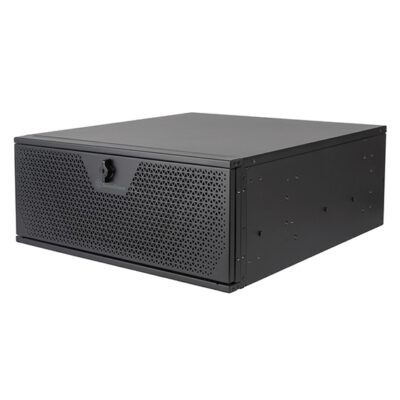
4U Rackmount Workstation
Built for permanent LED wall stage installations. Lives in the control room rack, drives the wall 24/7, and stays out of the volume. RTX PRO 6000 Blackwell Max-Q with 96GB VRAM and professional drivers handle the largest LED walls with genlock support. 256GB ECC for production stage reliability.
CPUAMD Threadripper 9975WX
GPUNVIDIA RTX PRO 6000 Blackwell Max-Q
RAM256 GB (8 × 32 GB) DDR5 ECC
Best ForStage installs, control rooms, genlock
Configure your build
Configure →
Common Bottlenecks
Where virtual production workstations slow you down.
Four hardware bottlenecks dominate professional virtual production deployments. Knowing which one hits your stage hardest shapes the right build — multi-GPU output for the wall, VRAM for scene complexity, ECC for stage reliability, professional drivers for genlock. The bottlenecks below explain what's actually scaling, what's not, and what costs the shoot when it goes wrong.
01
LED Wall Output Resolution
GPU-bound · VRAM-critical
LED walls run at 4K, 6K, or higher resolutions, often spanning multiple displays in nDisplay configurations. Driving these resolutions in real-time at 60 FPS with photoreal Lumen and Nanite is one of the most demanding GPU workloads in production. Multi-GPU configurations are common at larger volumes, and VRAM ceiling matters because LED wall scenes carry detailed environments with high-resolution textures.
The fix: Dual NVIDIA GeForce RTX 5080 16GB on Threadripper, or NVIDIA RTX PRO 6000 Blackwell Max-Q with 96GB VRAM for the largest walls.
02
Frame Sync & Genlock
Pro drivers · Hardware-locked
Clean ICVFX requires the LED wall, the camera, and the workstation rendering all locked to the same timing reference. Genlock support is critical — without it, the wall flickers or tears in camera. NVIDIA RTX PRO cards support Quadro Sync hardware (with the Quadro Sync II add-in card) for genlock; NVIDIA GeForce cards do not support genlock natively. Stages that need multi-camera shoots or LED walls synced to other production elements must use professional cards.
The fix: NVIDIA RTX PRO 6000 Blackwell Max-Q in the 4U rackmount build for stages needing genlock.
03
Stage Deployment Reliability
ECC RAM · 24/7 uptime
Permanent virtual production stages run shoots that span multi-day or multi-week schedules. A workstation crash during a scheduled shoot day costs the entire production day — far more than the cost of the workstation itself. ECC memory prevents silent corruption from memory bit errors that can cause crashes or visual artifacts on the wall. Professional drivers (NVIDIA RTX PRO line) are tested longer and certified for ISV applications including Unreal Engine, with more conservative update cadence for stage stability.
The fix: Threadripper + DDR5 ECC + NVIDIA RTX PRO drivers in the 4U rackmount build.
04
Scene Prep & Previs
Single-core · Editor-bound
Before the stage runs, artists spend hours preparing Unreal scenes — environment design, lighting, asset placement, lookdev, and previs. This work happens in the Unreal Editor where strong single-core CPU performance keeps the editor responsive during gameplay iteration and scene navigation. Pairing high-clock CPUs with capable GPUs keeps the iteration loop fast for the artists feeding the stage.
The fix: Intel Core Ultra 9 285K plus RTX 5080 16GB for artist seats in the scene prep pipeline.
Component Guidance
VP demands the highest tier. Spec for the stage.
Virtual production is one of the most demanding real-time 3D workflows in production. The GPU drives multi-display LED wall output at high framerates with photoreal Lumen and Nanite. ECC memory and professional drivers matter more than usual because crashes cost shoot days. Form factor matters because permanent stage installations need rack deployment, not desktop towers.
GPU Critical
RTX PRO for stages · GeForce for prep
The GPU drives LED wall output and is the most critical component. NVIDIA RTX PRO 6000 Blackwell Max-Q with 96GB VRAM is the right call for permanent stage installations — professional drivers, genlock support, and massive VRAM for large walls. Dual NVIDIA GeForce RTX 5080 16GB on Threadripper is appropriate for stage operators driving smaller volumes. Single RTX 5080 16GB handles artist seats and scene prep well.
CPU Role-dependent
TR PRO for stage · Core Ultra for artists
Stage operators benefit from AMD Threadripper 9970X (32 cores) — supports multi-GPU output and ECC for production reliability. Permanent stage installations call for Threadripper 9975WX in the 4U rackmount form factor. For artist seats focused on scene preparation and previs, Intel Core Ultra 9 285K is excellent — strong single-core for the Unreal Editor and previs iteration.
RAM ECC for stages
64GB artist · 128GB stage · 256GB rack
Virtual production RAM scales with stage complexity. 64GB DDR5 handles artist seats doing scene prep and previs. 128GB DDR5 ECC is recommended for stage operator workstations — substantial RAM for large Unreal scenes, ECC for production reliability. 256GB DDR5 ECC for permanent stage installations and rackmount workstations — enough for very large open-world scenes and live show switching between loaded environments.
Form Factor Rack vs tower
Tower for ops · 4U for installs
Stage operator and artist seat workstations work fine as desktop towers — they live near the user. Permanent stage installations need 4U rackmount form factor — fits in stage control room equipment racks alongside camera tracking servers, color grading hardware, and network gear. Rack form factor enables clean deployment for 24/7 production stages and is the standard for high-end virtual production volumes.
Performance Tips
Smoother stage. Real-world fixes.
Practical optimizations that move the needle on virtual production deployments — and how to spot the bottleneck when the wall doesn't look right in camera.
Use NVIDIA professional drivers for stages
RTX PRO drivers are tested longer and certified for ISV applications including Unreal Engine. More conservative update cadence keeps stages stable across multi-week shoots.
Add Quadro Sync II for genlock
Stages requiring camera-locked timing need Quadro Sync hardware. RTX PRO cards support it; GeForce cards do not. Spec for genlock during initial build, not after.
Match VRAM to LED wall scene
LED walls run high-res scenes with detailed environments. RTX 5080 16GB for typical stages; RTX PRO 6000 96GB for the largest walls and complex environments with lots of loaded geometry.
ECC RAM is non-negotiable for stages
A workstation crash mid-shoot costs the production day, not just the workstation. ECC prevents silent memory corruption that causes crashes or visual artifacts on the wall.
Rack-mount permanent installs
Stage workstations belong in the control room rack alongside camera tracking and color grading gear. 4U form factor keeps the volume clean and stable for 24/7 deployment.
Separate artist seats from stage
Don't double-duty the stage workstation as a scene prep machine. Artist seats with Intel Core Ultra build feed the stage with prepped scenes; the stage workstation just runs them.
Industries Served
Where virtual production workstations work.
Feature Film VP
LED wall stages & ICVFX shoots
Episodic Television
Series production on volume stages
Commercial Production
Brand campaigns & spots
Automotive Viz
Vehicle commercials & reveals
Live Events
Real-time graphics for stage shows
Game Cinematics
Real-time pre-rendered cinematics
Episodic VFX
Series VFX & cinematic sequences
Archviz Real-Time
Architectural walkthroughs on stage
Virtual Production Workstation FAQ
Virtual production builds, answered
Common questions on virtual production workstation specs, when to choose Threadripper vs Intel Core Ultra vs the 4U rackmount, and choosing the right hardware for LED wall stages, ICVFX, scene prep, or permanent installations. More questions? Contact our engineers.
What is a virtual production workstation?
A virtual production workstation is a desktop or rackmount computer purpose-built for in-camera VFX (ICVFX) on LED wall stages — the technology used in The Mandalorian, House of the Dragon, 1899, and an increasing number of major film and TV productions. Virtual production workstations drive real-time photoreal Unreal Engine scenes onto LED walls at high frame rates with frame sync to camera tracking systems, run multi-display output for the LED wall and operator monitors, and handle scene preparation, environment design, and previs feeding the stage. Hardware demands are intense: real-time Lumen and Nanite at 60+ FPS for LED wall output, substantial VRAM for high-resolution scene textures, and ECC memory for production stage reliability.
What CPU is best for virtual production?
Virtual production CPU needs depend on the role. Stage operators and ICVFX supervisors driving LED walls benefit from AMD Threadripper 9970X (32 cores) — high core count for shader compilation, asset preparation, and running real-time Unreal Engine scenes alongside camera tracking. For permanent stage installations and control rooms, AMD Threadripper 9975WX (32 cores PRO) is the right call — ECC memory support, professional platform reliability, and the ability to scale up to 96 cores on the same WRX90 platform. For artist seats focused on scene preparation and previs, Intel Core Ultra 9 285K is excellent — strong single-core for the Unreal Editor and previs iteration.
What GPU is best for virtual production?
The GPU is the most critical component for virtual production. NVIDIA RTX PRO 6000 Blackwell Max-Q with 96GB VRAM is the right choice for permanent LED wall stage installations — professional NVIDIA drivers (more reliable for stage deployments than GeForce), massive VRAM for very large LED wall scenes with high-resolution textures, and 24/7 production-grade stability. For workstations driving smaller LED setups or volume stages, dual NVIDIA GeForce RTX 5080 16GB delivers strong performance at a more accessible price — multi-GPU configurations help drive multi-display LED walls. For artist seats, single RTX 5080 16GB handles scene prep and previs well.
How much RAM does virtual production need?
Virtual production RAM scales with stage scale and workflow. 64GB DDR5 handles artist seats doing scene prep, previs, and environment design feeding the stage. 128GB DDR5 ECC is recommended for stage operator workstations driving LED walls — substantial RAM for large Unreal scenes with detailed environments, ECC for production reliability. 256GB DDR5 ECC is the right call for permanent stage installations and rackmount workstations — enough RAM for very large open-world scenes, multiple loaded environments for live show switching, and headroom for additional production tools running on the same machine. ECC memory is strongly recommended for any production stage deployment.
Why use a 4U rackmount workstation for virtual production?
Permanent virtual production stages need rackmount workstations rather than desktop towers for several reasons. Rack form factor fits in stage control room equipment racks alongside camera tracking servers, color grading hardware, and network equipment — much cleaner than a tower on the floor. Professional NVIDIA drivers (RTX PRO line) are more reliable for 24/7 production deployment than GeForce drivers. ECC memory matters more in rack deployments where systems run continuously across multi-day shoots. The VRLA Tech 4U rackmount build with Threadripper 9975WX, RTX PRO 6000 Blackwell Max-Q, and 256GB DDR5 ECC is purpose-built for permanent stage installations — it lives in the rack, drives the wall, and runs without intervention.
Threadripper or Intel Core Ultra for virtual production?
Both serve different roles in a virtual production pipeline. AMD Threadripper 9970X is the right call for stage operator workstations and ICVFX supervisors — dual-GPU configuration drives multi-display LED walls, ECC memory adds production reliability, and 32 cores accelerate shader compilation when prepping scenes for the stage. AMD Threadripper 9975WX in the 4U rackmount is the right call for permanent stage installations with RTX PRO 6000 Blackwell Max-Q for the largest LED walls. Intel Core Ultra 9 285K is the right call for artist seats — scene prep, environment design, previs, and lighting work feeding the stage where strong single-core Unreal Editor performance matters more than dual-GPU output.
Does virtual production need NVIDIA professional drivers?
For permanent stage installations and 24/7 production deployments, NVIDIA professional drivers (RTX PRO line) are strongly recommended over GeForce drivers. Professional drivers are tested longer and certified for ISV applications including Unreal Engine, offer better multi-display stability for LED wall driving, and are more conservative in update cadence — important for stages that need driver stability across multi-week shoots. The VRLA Tech 4U rackmount build ships with RTX PRO 6000 Blackwell Max-Q for this reason. For artist seats and smaller stage operators, NVIDIA GeForce RTX 5080 is fine — most virtual production workflows run excellently on consumer drivers, and dual GeForce RTX 5080 in the Threadripper build is a more cost-effective path to multi-GPU output.
Can virtual production workstations also handle game development?
Yes — virtual production workstations and game development workstations share most of the same hardware fundamentals because both run Unreal Engine intensively. The Threadripper 9970X build with dual RTX 5080 16GB is excellent for game development studios that also do virtual production work, archviz studios producing real-time walkthroughs, and broadcast teams running Unreal for live graphics. The Intel Core Ultra 9 285K build serves equally well as a game dev artist seat or a virtual production scene prep seat. The main differentiator is the 4U rackmount build — that's specifically for stage installations and isn't typically used for general game dev.
What about frame sync and Genlock for LED walls?
Frame sync (genlock) keeps the LED wall, the camera, and the workstation rendering all locked to the same timing reference — essential for clean in-camera VFX without flicker or tearing. NVIDIA RTX PRO cards include Quadro Sync hardware support with the optional Quadro Sync II card, making the 4U rackmount build with RTX PRO 6000 Blackwell Max-Q the right call for stages requiring genlock. NVIDIA GeForce cards do not support genlock natively. For multi-display LED walls requiring frame-locked output across multiple GPUs, professional cards plus the Quadro Sync II add-in card is the recommended path. Contact VRLA Tech for custom virtual production specifications including genlock setup.
Where can I buy a virtual production workstation?
VRLA Tech builds and sells custom virtual production workstations hand-assembled in Los Angeles since 2016. Configure and buy a build at vrlatech.com/vrla-tech-workstations/virtual-production. Three configurations cover the deployment range: the VRLA Tech AMD Threadripper Workstation for Virtual Production at vrlatech.com/product/vrla-tech-amd-ryzen-threadripper-pro-workstation-for-virtual-production for stage operators and ICVFX supervisors with dual-GPU output; the VRLA Tech Intel Core Ultra Workstation for Virtual Production at vrlatech.com/product/vrla-tech-intel-core-ultra-workstation-for-virtual-production for artist seats and scene preparation; and the VRLA Tech 4U Rackmount Workstation for Virtual Production at vrlatech.com/product/vrla-tech-4u-rackmount-workstation-for-virtual-production for permanent stage installations. Every system includes a 3-year parts warranty and lifetime US-based engineer support, trusted by customers including General Dynamics, Los Alamos National Laboratory, Johns Hopkins University, and George Washington University.
What is the best computer for virtual production in 2026?
The best computer for virtual production in 2026 depends on role. For permanent LED wall stage installations with 24/7 production deployment, the VRLA Tech 4U Rackmount Workstation with AMD Threadripper 9975WX, NVIDIA RTX PRO 6000 Blackwell Max-Q (96GB VRAM), and 256GB DDR5 ECC is the right call — rack form factor, professional drivers, ECC reliability, and massive VRAM for the largest LED walls. For stage operators and ICVFX supervisors at smaller volumes, the Threadripper 9970X workstation with dual RTX 5080 16GB and 128GB DDR5 ECC delivers production performance at a more accessible price. For artist seats handling scene prep and previs, the Intel Core Ultra 9 285K build with RTX 5080 16GB and 64GB DDR5 is appropriate. Configure at vrlatech.com/vrla-tech-workstations/virtual-production.
What warranty comes with a VRLA Tech virtual production workstation?
Every VRLA Tech virtual production workstation includes a 3-year parts warranty and lifetime US-based engineer support at no extra cost. Each system is hand-assembled in Los Angeles, burn-in tested under sustained Unreal Engine and real-time rendering workloads, and shipped ready to drive LED wall stages or run Unreal Engine for ICVFX out of the box. Replacement parts ship under warranty with direct engineer access via phone and email — engineers specialize in real-time 3D production and virtual production workflows, not general IT. Buy a build at vrlatech.com/vrla-tech-workstations/virtual-production.
1 / 4
Custom-built. Burn-in tested. Shipped ready.Tell us about your
Tell us about your
stage build.
Stage scale, LED wall resolution, genlock requirements, multi-display configuration, control room rack space, scene prep pipeline. We'll spec the right hardware and quote the build.



