No products in the cart.
Machine Learning · AI Training · Built in LA
ML systems, engineered to train.
Purpose-built workstations for AI development, model training, and inference. Single GPU to quad-GPU NVIDIA RTX PRO Blackwell, balanced PCIe Gen5 bandwidth, ECC DDR5 memory, and NVMe storage configured for sustained multi-week workloads. Hand-assembled in Los Angeles.
Trusted by AI Research Labs, ML Engineers, Universities, Government Agencies


Real AI Workstations
Real systems. Real customer deployments.
See how VRLA Tech configures RTX PRO Blackwell workstations and GPU servers around actual AI workloads, model requirements, and deployment constraints.
Professional AI Workstation
Colorado AI · RTX PRO 6000 Blackwell
High-VRAM professional workstation configured for local AI development and demanding compute workloads.
View Case Study → 3-GPU · AI Software DevelopmentReapt · 3× RTX PRO 6000 Blackwell
Threadripper PRO workstation with 288GB of total GPU memory for concurrent local LLM inference and AI-native software development.
View Case Study → 8-GPU · Production AI ServerGoodwill NCW · 8-GPU Blackwell Server
Rackmount AI server with eight RTX PRO 6000 Blackwell Server Edition GPUs and 768GB of total GPU memory for production AI workloads.
View Case Study →
Machine Learning Use Cases
Built around your models, data, and training workflow.
VRLA Tech configures machine learning workstations around the workload you actually run — from single-GPU development to multi-GPU training, fine-tuning, and production inference.
Computer Vision
GPU-accelerated training and inference for image classification, object detection, segmentation, video analysis, and other vision workloads using frameworks such as PyTorch and TensorFlow.
NLP & Transformer Training
High-VRAM NVIDIA GPU configurations for transformer training, embedding generation, text classification, retrieval pipelines, and natural-language model development.
Reinforcement Learning
Balanced CPU and GPU platforms for simulation-heavy RL workflows, parallel environments, policy training, experimentation, and repeated local training runs.
Recommendation Systems
Systems sized for large datasets, feature engineering, embedding models, ranking pipelines, and GPU-accelerated training for personalization and recommendation workloads.
Multimodal AI
Multi-GPU workstations for models combining text, image, video, or audio inputs, with GPU memory and system RAM sized around model scale and dataset requirements.
Time-Series Forecasting
Local compute for forecasting, anomaly detection, predictive maintenance, financial modeling, sensor analytics, and other machine learning workflows built on sequential data.
LLM Fine-Tuning
High-VRAM single- and multi-GPU configurations for LoRA, QLoRA, supervised fine-tuning, evaluation, and distributed language-model workflows without relying entirely on cloud GPU capacity.
Production Inference
Dedicated on-premise systems for low-latency inference, private model serving, batch inference, internal AI applications, and workloads that benefit from predictable local compute.
Choose Your ML Workstation
Three platforms. One for every stage of ML development.
From single-GPU research to quad-GPU LLM fine-tuning. Each configuration is fully customizable — these are validated starting points, tested for CUDA compatibility, thermal performance, and sustained training stability. Storage, memory, and GPUs scale to match your models and datasets.
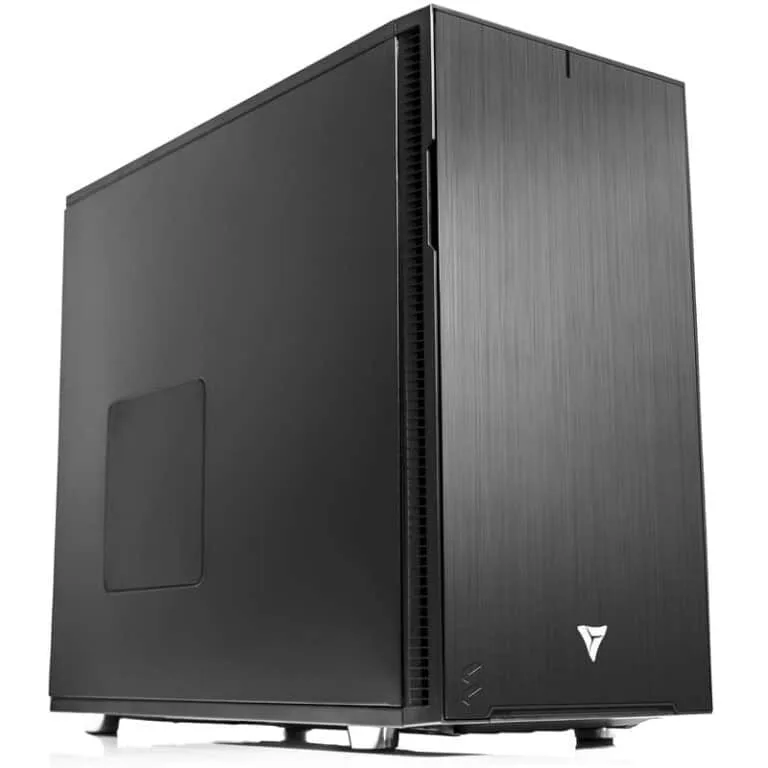
01 · Development
Configure & Buy →
ML Developer Workstation
Compact and efficient for AI research, computer vision, and small diffusion models. Best for local PyTorch and TensorFlow development, prototyping.
CPUAMD Ryzen 9 9900X
GPUNVIDIA RTX 5080 · 16 GB
RAM64 GB DDR5 · up to 192GB
Storage2 TB NVMe Gen5 + 4 TB SSD
Form FactorDesktop tower
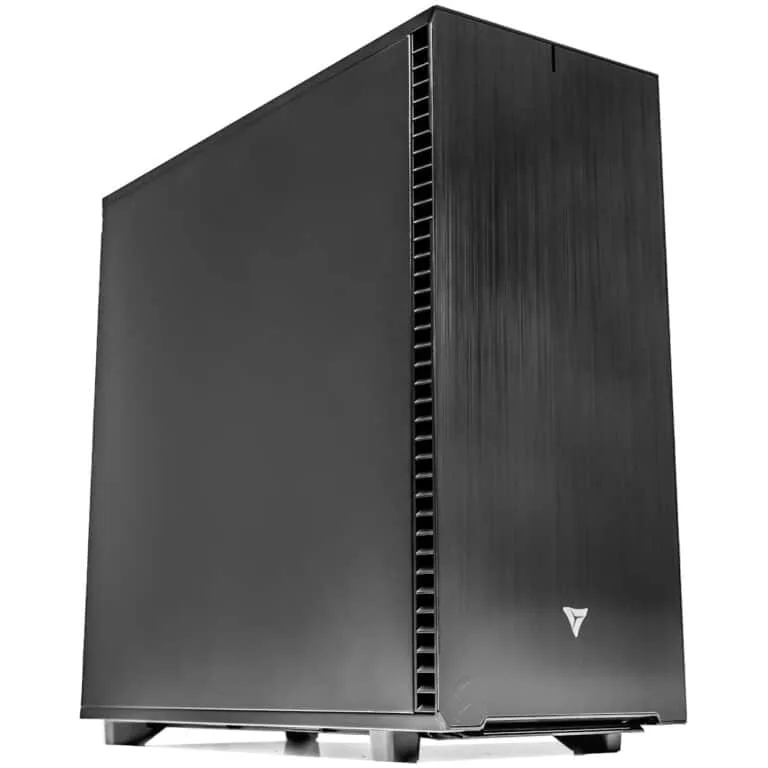
02 · Most Configured
Configure & Buy →
Multi-GPU AI Workstation
Dual-GPU tower for deep learning, training, and reinforcement learning simulations. Best for production model training, RL, and multi-modal research.
CPUIntel Xeon w7-3565X
GPU2× RTX PRO 6000 · 192 GB VRAM
RAM256 GB ECC DDR5
Storage4 TB NVMe Gen5 + 8 TB SSD
Form FactorTower · Multi-GPU
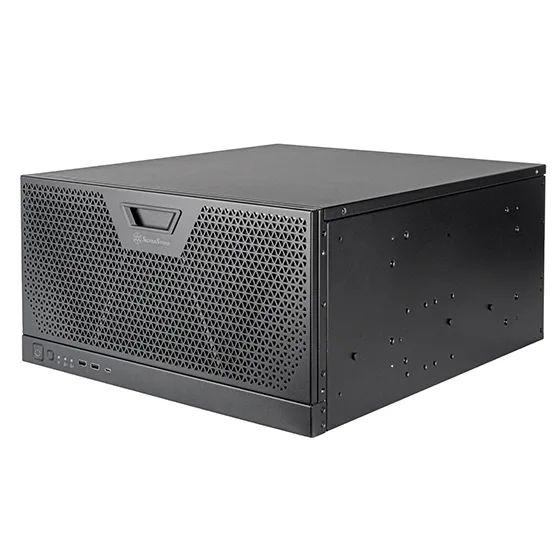
03 · LLM & Production
Configure & Buy →
Quad-GPU LLM Workstation
5U convertible chassis built for large language model fine-tuning and parallel inference. Best for LLM fine-tuning, parallel inference, and enterprise deployment.
CPUIntel Xeon w7-3565X
GPU4× RTX PRO 6000 · 384 GB VRAM
RAM512 GB ECC DDR5 · up to 1TB
Storage4 TB NVMe Gen5 + 16 TB SSD
Form Factor5U Rackmount · Production
Frameworks & Toolchains
Configured for the frameworks you use.
When requested, VRLA Tech ML workstations can ship with NVIDIA drivers, CUDA, cuDNN, NCCL, containers, and your selected ML frameworks installed and validated for the delivered hardware and operating system.

PyTorch
Dynamic computation graphs and native CUDA acceleration. Preferred by research labs for rapid architecture prototyping and modern transformer training.
TensorFlow
Google's production-grade platform for large-scale training, scalable serving, XLA compilation, TensorRT integration, and enterprise cloud integration.
JAX
High-performance numerical computing with best-in-class automatic differentiation. Cutting-edge research on TPU and GPU with composable function transformations.

NVIDIA RAPIDS
GPU-accelerated data science libraries (cuDF, cuML, cuGraph). Massive speedups for preprocessing, analytics, and feature engineering at dataset scale.

Scikit-learn
Classical ML — regression, classification, and clustering workflows. Often paired with deep learning in end-to-end production ML pipelines.
CUDA Toolkit
The backbone of GPU acceleration. NVIDIA drivers, cuDNN, NCCL, TensorRT, and compilers pre-installed and version-matched to your workload.
Cloud vs On-Premise
Still renting cloud GPUs?
Cloud GPUs are useful for burst capacity and short-term experimentation, but sustained workloads can make recurring compute and data-transfer costs significant. A purpose-built ML workstation gives your team dedicated, predictable compute with local control of hardware, data, software, and scheduling.
Run the numbers on your specific workflow with the AI ROI Calculator. Input your training hours, GPU type, and data volume — see where on-premise pays back versus where cloud still wins.
Local
No cloud egress for on-prem data
Dedicated
Compute available to your team
Predictable Fixed Cost
Compare ownership against your actual cloud usage
Engineering Principles
Balanced architecture, built to eliminate bottlenecks.
Training performance is governed by the weakest link in the pipeline. GPU compute stalls without matching PCIe bandwidth. Memory bandwidth caps effective throughput long before capacity does. Storage latency starves tensor operations during checkpointing. Every subsystem is specified for sustained, multi-week workloads.
01 · GPU ARCHITECTURE
The compute engine
The GPU is usually the primary performance driver. Model size, precision, batch size, and context length determine memory requirements. Multi-GPU frameworks can distribute models and workloads across several GPUs when a single card is not enough.
RTX 5080RTX PRO 6000NCCL
02 · ECC DDR5 MEMORY
Stable for multi-day runs
ECC system memory is strongly recommended for long-running research and production workloads. Capacity should be sized around dataset handling, preprocessing, CPU offload, and total GPU memory rather than a fixed rule for every ML workload.
256 GB ECC512 GB ECC1 TB ECC
03 · PCIe 5.0 NVMe
Storage that keeps up
Fast NVMe storage helps with dataset loading, checkpointing, scratch space, and high-throughput pipelines. RAID0 can increase throughput but provides no redundancy; RAID10 can add redundancy while maintaining strong performance when the workload justifies multiple drives.
Gen5 NVMeRAID0RAID10
04 · WORKSTATION CPU
No idle GPU bubbles
Threadripper PRO and Xeon W provide the PCIe connectivity, memory bandwidth, and CPU resources needed for demanding multi-GPU workflows. Actual GPU slot bandwidth depends on the processor platform, motherboard, and complete system configuration.
Xeon WThreadripper PROPCIe Gen5
Why VRLA Tech
Not just PC builders. AI infrastructure specialists.
Since 2016 we've built custom machine learning workstations for AI research labs, ML engineers, universities, and government agencies — hand-assembled in Los Angeles, framework-validated, and backed by US-based engineer support that specializes in HPC and AI workflows.
Up to 4× RTX PRO 6000 Blackwell
96GB ECC GDDR7 per GPU, with up to 384GB of total GPU memory across four cards. Frameworks such as PyTorch, DeepSpeed, and NCCL can distribute compatible training and inference workloads across multiple GPUs.
Up to 1TB ECC DDR5
Massive RAM for dataset prefetch, CPU offloading, gradient accumulation, and multi-day training. ECC prevents silent corruption that invalidates results.
Xeon W & Threadripper PRO
Workstation-class PCIe connectivity and memory bandwidth for multi-GPU training and inference. Platform and motherboard selection are matched to GPU count, storage, networking, and expansion requirements.
Framework validation
PyTorch, TensorFlow, JAX, NVIDIA RAPIDS, Scikit-learn, CUDA, cuDNN, NCCL, and related tools can be installed and version-matched to your requested deployment stack before shipment.
3-year parts warranty
Standard on every system. Replacement parts ship under warranty with direct engineer access.
Lifetime AI/HPC engineer support
Lifetime US-based technical support is included, with direct access to the VRLA Tech team for hardware troubleshooting, configuration questions, and upgrade planning.
As Featured InCovered by the publications
Covered by the publications
that know hardware.
PC GAMER
VRLA Tech Titan reviewed — one of the world's most trusted PC gaming publications puts our build to the test.
Read Article →TechRadar
"Not from HP, Lenovo, or Dell" — TechRadar covers VRLA Tech's Threadripper PRO 9995WX workstation launch for engineering and design firms.
Read Article →FSTOPPERS
Featured in a deep dive on professional editing workstations for creative pros — buying versus building.
Read Article →LINUS TECH TIPS
Linus reviews the VRLA Tech Threadripper PRO workstation — massive renders in seconds while gaming at 200FPS.
Watch Video →
Machine Learning Workstation FAQ
Common questions, answered
Hardware guidance for AI researchers, ML engineers, universities, and government agencies running PyTorch, TensorFlow, JAX, RAPIDS, and Scikit-learn workloads from prototyping to multi-GPU LLM fine-tuning. Start with the technical questions — buyer-intent answers follow. More questions? Email our engineers.
Which ML frameworks are supported on VRLA Tech machine learning workstations?
VRLA Tech can configure machine learning workstations for PyTorch, TensorFlow, JAX, NVIDIA RAPIDS, Scikit-learn, CUDA, cuDNN, NCCL, TensorRT, Docker, and related AI toolchains. When software installation is requested, the selected drivers, CUDA environment, frameworks, and containers are installed and validated against the delivered hardware and operating system before shipment.
Do I need ECC memory for machine learning?
ECC memory is strongly recommended for long-running research and production workloads because it can detect and correct certain memory errors that would otherwise go unnoticed. The Multi-GPU AI and Quad-GPU configurations use ECC DDR5 by default, while lower-cost development systems may use non-ECC memory when the workload does not justify a workstation-class platform.
Can I scale to multiple GPUs later?
Yes, if the original platform, chassis, power supply, cooling, and motherboard are selected with expansion in mind. Intel Xeon W and AMD Threadripper PRO platforms provide substantially more PCIe connectivity than mainstream desktop platforms, which makes them better suited to multi-GPU systems. VRLA Tech can plan the initial configuration around the number of GPUs you expect to add later and verify slot spacing, available PCIe bandwidth, power, and cooling before the system is built.
What operating systems do you support for ML workstations?
Windows 11 Pro and Ubuntu Linux are offered by default. Rocky Linux, Debian, and other distributions can be pre-installed upon request. All systems ship with CUDA drivers configured and ML framework compatibility validated regardless of OS choice. Linux distributions like Ubuntu and Rocky are the standard for HPC and AI research because they provide direct access to CUDA, NCCL, and containerization tools (Docker, Kubernetes). Windows is often chosen by teams using GUI-based tools or commercial Windows-first software. Dual-boot and WSL2 setups are also supported.
How does an on-prem ML workstation compare to cloud GPUs?
On-premise and cloud GPUs solve different problems. Cloud is often a strong fit for burst capacity, temporary experiments, or workloads that change frequently. Owned ML hardware can be attractive for sustained utilization, predictable capacity, local data control, and teams that want to avoid recurring cloud-compute and egress costs. The economics depend on utilization, hardware, electricity, cloud pricing, and workload duration. Use the AI ROI Calculator to compare your own numbers.
What's the warranty and support coverage on VRLA Tech ML workstations?
VRLA Tech machine learning workstations include a 3-year parts warranty and lifetime US-based technical support. Completed systems undergo a 48-hour burn-in and stability-validation process before shipment. When a software stack is requested, the relevant drivers and frameworks can also be installed and validated. Support is available for hardware troubleshooting, configuration questions, and upgrade planning.
How much VRAM do I need for machine learning?
VRAM requirements depend on model size, precision, batch size, sequence length, optimizer state, and whether the workload is training, fine-tuning, or inference. A 16GB GPU can be useful for development and smaller models, while professional 48GB–96GB GPUs provide substantially more headroom for larger datasets and models. Multi-GPU frameworks can partition compatible models and workloads across multiple GPUs, but the memory does not automatically appear as one unified VRAM pool. VRLA Tech sizes GPU count and memory around the actual model and framework rather than using a single rule for every workload.
What CPU is best for machine learning workstations?
Machine learning is often GPU-dominant, but CPU resources still matter for preprocessing, tokenization, augmentation, storage I/O, and feeding multiple GPUs efficiently. Ryzen can be a strong value for single-GPU development. For multi-GPU workstations, Intel Xeon W and AMD Threadripper PRO provide substantially more PCIe connectivity, ECC memory support, and memory bandwidth. The correct CPU depends on GPU count, data pipeline, storage, networking, and how much CPU-side work your application performs.
Where can I buy a machine learning workstation?
VRLA Tech builds and sells custom machine learning workstations hand-assembled in Los Angeles since 2016. Configure and buy a build at vrlatech.com/machine-learning-workstation-ai-workstation. Three configurations cover the full ML stack: the ML Developer Workstation with AMD Ryzen 9 9900X and RTX 5080 16GB at vrlatech.com/product/vrla-tech-amd-ryzen-workstation-for-ai-machine-learning, the Multi-GPU AI Workstation with Xeon w7-3565X and dual RTX PRO 6000 Blackwell at vrlatech.com/product/vrla-tech-ai-workstation-deep-learning-workstation-machine-learning-workstation, and the Quad-GPU LLM Workstation in 5U rackmount with Xeon w7-3565X and quad RTX PRO 6000 Blackwell at vrlatech.com/product/vrla-tech-intel-xeon-5u-rackmount-workstation-for-machine-learning-ai-training-and-ai-large-language-models. Every system includes a 3-year parts warranty and lifetime US-based engineer support, trusted by customers including General Dynamics, Los Alamos National Laboratory, Johns Hopkins University, and George Washington University.
What should I look for in a machine learning workstation?
Start with the workload: model size, training versus inference, framework, dataset size, target batch size, and expected concurrency. Then size GPU memory and GPU count first, followed by PCIe connectivity, system RAM, NVMe storage, networking, power, and cooling. A single-GPU Ryzen system can be excellent for development, while multi-GPU production workloads often benefit from Xeon W or Threadripper PRO platforms with ECC memory and additional PCIe connectivity. VRLA Tech can configure either approach around the workload and budget.
What workstation configuration is suitable for LLM fine-tuning?
LLM fine-tuning should be sized around the model, precision, fine-tuning method, context length, batch size, and framework. High-VRAM GPUs reduce the need for aggressive offloading or memory-saving techniques, and multi-GPU frameworks can distribute compatible workloads across several GPUs. One VRLA Tech starting point is a 4× RTX PRO 6000 Blackwell configuration with 96GB ECC GDDR7 per GPU and 512GB ECC system memory, but smaller or larger configurations may be more appropriate depending on the model and training method.
What should I look for in an ML workstation builder?
Look for a builder that can explain the tradeoffs between GPU memory, PCIe connectivity, CPU platform, system RAM, storage, power, cooling, and software deployment for your specific workload. VRLA Tech has built custom workstations in Los Angeles since 2016 and offers configurations from single-GPU development systems through multi-GPU RTX PRO workstations. Systems include a 3-year parts warranty and lifetime US-based technical support, and requested software stacks can be installed and validated before shipment.
VRLA Tech vs Lambda Labs or Bizon for ML workstations?
VRLA Tech, Lambda, and Bizon all serve buyers looking for professional AI hardware, but their product mix, configuration options, support models, pricing, and lead times can differ. VRLA Tech focuses on fully custom workstation and GPU-server configurations, including Ryzen, Xeon W, Threadripper PRO, and multi-GPU RTX PRO systems, with 3-year parts warranty and lifetime US-based technical support. Buyers should compare the exact GPU model and count, CPU platform, memory, storage, networking, warranty, software requirements, lead time, and total quoted price rather than comparing vendor names alone.
Cloud GPUs vs owning an ML workstation — what's the ROI?
The ROI depends on utilization, cloud provider and instance type, hardware configuration, electricity, data-transfer costs, and how long the system will be used. Cloud often makes sense for bursty or temporary workloads; owned hardware can become more economical for sustained utilization while also giving the team dedicated capacity and local data control. Use the VRLA Tech AI ROI Calculator at vrlatech.com/ai-roi-calculator to model your own cloud-vs-on-premise economics.
ML workstation with 3-year warranty and US support?
VRLA Tech machine learning workstations include a 3-year parts warranty and lifetime US-based technical support. Systems are hand-assembled in Los Angeles and undergo a 48-hour burn-in and stability-validation process before shipment. If you request a software stack, VRLA Tech can also install and validate the required NVIDIA drivers, CUDA environment, frameworks, and containers for the delivered configuration.
1 / 5
Custom-built. CUDA-validated. Burn-in tested.Build the right
Build the right
AI infrastructure for your workload.
Talk to a US-based engineer about your training workload, budget, and timeline. We'll spec the exact configuration — no generic quotes, no sales scripts.