No products in the cart.
Generative AI Workstations · Diffusion · Multimodal · Built in LA
Generative AI workstations built for local AI.
Custom-built Generative AI workstations optimized for LLM fine-tuning, diffusion models, and multimodal AI. High-VRAM NVIDIA RTX 5090 GPUs, ECC DDR5 memory, and PCIe Gen5 NVMe storage deliver fast training and production-grade inference. Hand-assembled in Los Angeles.
Trusted by AI Research Labs, ML Engineers, AI Startups, Enterprise Teams


Choose Your GenAI Workstation
Two configurations. Prototype to enterprise.
The GenAI Essential is a desktop AMD Ryzen platform for local experimentation, image generation, diffusion workflows, and compact-model fine-tuning. The GenAI Performance uses AMD Threadripper PRO with dual GPUs and ECC memory for larger datasets, multi-GPU training workflows, and multimodal research. For workloads that need substantially more VRAM, VRLA Tech also builds RTX PRO 6000 Blackwell workstation and server configurations.
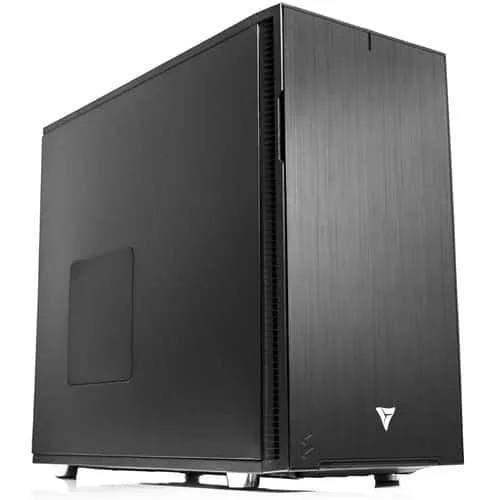
GenAI Essential
Configure This Build →
AMD Ryzen Workstation for Generative AI
A desk-friendly platform for Stable Diffusion, ComfyUI, image generation, local inference, prompt development, and fine-tuning smaller models. Configured around your software stack and storage needs.
CPUAMD Ryzen 9 9900X
GPUNVIDIA RTX 5090 · 32 GB
RAM64 GB DDR5 · up to 192GB
Storage2 TB NVMe Gen5 + 4 TB SSD
Form FactorDesktop tower · 360mm AIO
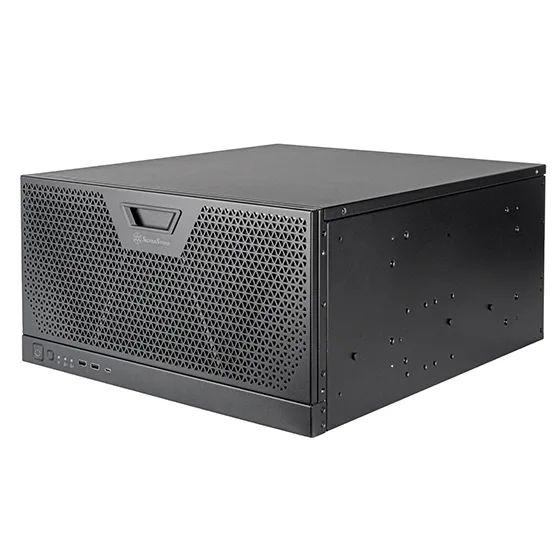
GenAI Performance
Configure This Build →
AMD Threadripper PRO 5U Rackmount for Generative AI
Designed for multi-GPU diffusion, multimodal development, larger fine-tuning jobs, and local AI pipelines that benefit from additional CPU, memory, storage, and PCIe resources.
CPUAMD Threadripper PRO 9965WX
GPU2× NVIDIA RTX 5090 · 64 GB total
RAM128 GB DDR5 REG ECC · up to 1TB
Storage2 TB NVMe Gen5 + 8 TB SSD
Form Factor5U Rackmount · Production cooling
Generative AI Use Cases
Built around the workload you actually run.
VRLA Tech configures Generative AI workstations for local and on-prem AI development, from creative diffusion workflows to multimodal research and private enterprise AI.
Image Generation & Diffusion
Stable Diffusion, SDXL, ComfyUI, Automatic1111, LoRA training, ControlNet, upscaling, and high-resolution batch generation.
Video & Multimodal AI
Workflows that combine text, image, audio, and video models with high-VRAM GPUs, fast local storage, and large system memory.
Local LLM Development
Run and fine-tune open models locally for prototyping, private AI, internal copilots, and workflows that should not depend on a cloud API.
RAG & Document Intelligence
Local generation, embeddings, vector search, retrieval pipelines, and document-processing workloads using tools such as LangChain and LlamaIndex.
Agentic AI & Copilots
Build internal AI agents and assistants that combine local models, tool use, retrieval, automation, and private company data.
Fine-Tuning & LoRA
LoRA, QLoRA, diffusion fine-tuning, and other parameter-efficient workflows sized around model scale, precision, and available GPU memory.
Creative AI Pipelines
Generative workflows for media, design, visualization, content creation, and studios that need local GPU performance and predictable availability.
Private / On-Prem AI
Keep model weights and sensitive data on hardware you control for enterprise, research, and proprietary-development environments.
Real AI Deployments
Real systems. Real AI deployments.
Detailed customer case studies show the hardware, workload, and deployment decisions behind real VRLA Tech AI systems.
LOCAL LLM DEVELOPMENT
Reapt · 3× RTX PRO 6000 Blackwell
Threadripper PRO workstation configured for concurrent local LLM inference pipelines with 288GB of aggregate GPU memory across three RTX PRO 6000 Blackwell GPUs.
View Case Study →
AI WORKSTATION
Colorado AI · RTX PRO 6000 Blackwell
A high-VRAM Blackwell workstation deployment for local AI development and GPU-accelerated model workflows.
View Case Study →
8-GPU BLACKWELL SERVER
Goodwill NCW · 8× RTX PRO 6000
An 8-GPU Blackwell server with 768GB of aggregate GPU memory, dual AMD EPYC processors, 1.5TB ECC memory, and 48-hour burn-in validation.
View Case Study →
Frameworks & Toolchains
Validated for the AI stack you actually use.
VRLA Tech can validate your Generative AI workstation around the frameworks and toolchains your team actually uses. NVIDIA drivers, CUDA libraries, containers, and selected frameworks can be installed and version-matched when requested.

Hugging Face Transformers
End-to-end fine-tuning and inference for thousands of open models. Hardware optimized for tokenization throughput, mixed-precision training, and efficient serving.

Stable Diffusion (A1111)
High-VRAM GPUs shorten sampling times and enable larger UNet backbones, textual inversion, LoRA training, and high-resolution batch generation.

NVIDIA NeMo
Framework for building, customizing, and deploying LLMs with support for tensor parallelism, sharded training, and accelerated inference.

LangChain
Framework for building LLM applications with tool use, agents, and Retrieval-Augmented Generation (RAG) pipelines.

OpenAI Triton
Write custom GPU kernels for peak performance in attention blocks and fused ops. Ideal for advanced researchers pursuing maximum throughput.

PyTorch
Research-friendly deep learning with dynamic computation graphs, rich ecosystem support, and seamless CUDA/cuDNN acceleration for transformers and diffusion.
TensorFlow
Production-grade ML framework with XLA compilation, TensorRT integration, and scalable serving for real-time generative inference.

ComfyUI
Node-based workflows for Stable Diffusion, FLUX, ControlNet, LoRA, upscaling, image generation, video generation, and custom local diffusion pipelines.
Explore ComfyUI Workstations →
What Drives GenAI Performance
Generative AI has four bottlenecks.
Generative AI performance comes down to four things: GPU + VRAM for model size and batch throughput, CPU for data pipeline preprocessing and multi-GPU coordination, RAM for dataset loading and CPU offload, and NVMe for fast checkpointing. Get any of these wrong and training will stall, OOM, or run at a fraction of theoretical throughput.
DEMAND 01 · GPU + VRAM
Model size + batch
VRAM determines what you can fit. RTX 5090 32GB handles diffusion + compact LLMs. Multi-GPU workflows can distribute models and training across devices when supported by the framework; GPU memory remains device-local rather than becoming one transparent pool. RTX PRO 6000 Blackwell 96GB is available for workloads that need substantially more memory per GPU.
DEMAND 02 · CPU
Data pipeline + tensor parallel
Data loading, tokenization, and feeding multi-GPU systems without idle bubbles. Threadripper PRO provides substantially more PCIe connectivity for multi-GPU systems, while Ryzen 9 is a strong fit for single-GPU prototyping and creative AI workflows.
DEMAND 03 · RAM
Dataset + offload
Dataset prefetch, CPU offloading for low-VRAM scenarios, and gradient accumulation. ECC DDR5 can detect and correct certain memory errors, making it valuable for long-running or high-value workloads. Capacity can scale to 1TB on supported workstation platforms.
64 GB128 GB ECC1 TB ECC
DEMAND 04 · NVMe Gen5
Checkpoints + datasets
Fast NVMe storage helps with datasets, checkpoints, model files, and cache-heavy workflows. RAID 0 can increase throughput but provides no redundancy; RAID 10 can add redundancy where the workload and drive count justify it.
Gen5 NVMe14 GB/sRAID0/10
Why VRLA Tech
Built for AI teams.
Since 2016 we've built custom AI workstations for AI research labs, ML engineers, AI startups, prompt engineers, and enterprise AI teams — hand-assembled in Los Angeles, framework-validated, and backed by US-based engineer support that specializes in HPC and AI workflows.
NVIDIA RTX 5090 32GB
High-VRAM consumer flagship for diffusion, compact LLM fine-tuning, and prototyping. Single- or dual-GPU configurations for diffusion, local inference, and distributed multi-GPU workflows where supported by the software stack.
Up to 1TB DDR5 ECC
Large memory capacity supports dataset prefetch, CPU offload, preprocessing, and large local pipelines. ECC can detect and correct certain memory errors on supported platforms.
Threadripper PRO multi-GPU
Threadripper PRO provides the PCIe lane budget and memory capacity needed for serious multi-GPU workstation designs; exact GPU link widths depend on the motherboard and system topology.
Framework validation
PyTorch, TensorFlow, Hugging Face, NeMo, Triton, LangChain, Stable Diffusion pre-configured. CUDA toolkit + drivers shipped ready to run training day one.
3-year parts warranty
Standard on every system. Replacement parts ship under warranty with direct engineer access.
Lifetime AI/HPC engineer support
Speak directly with US-based engineers who specialize in HPC and AI workflows — not general IT staff. No tiered support contracts.
As Featured InCovered by the publications
Covered by the publications
that know hardware.
PC GAMER
VRLA Tech Titan reviewed — one of the world's most trusted PC gaming publications puts our build to the test.
Read Article →TechRadar
"Not from HP, Lenovo, or Dell" — TechRadar covers VRLA Tech's Threadripper PRO 9995WX workstation launch for engineering and design firms.
Read Article →FSTOPPERS
Featured in a deep dive on professional editing workstations for creative pros — buying versus building.
Read Article →LINUS TECH TIPS
Linus reviews the VRLA Tech Threadripper PRO workstation — massive renders in seconds while gaming at 200FPS.
Watch Video →
Generative AI Workstation FAQ
Common questions, answered
Hardware guidance for AI researchers, ML engineers, AI startups, and prompt engineers running LLM fine-tuning, Stable Diffusion, multimodal AI, and inference workloads. Start with the technical questions — buyer-intent answers follow. More questions? Email our engineers.
Why does Generative AI need specialized workstation hardware?
Modern transformer models contain billions of parameters and push the limits of memory bandwidth and GPU VRAM. Unlike traditional deep learning, generative workloads are uniquely sensitive to VRAM capacity, inter-GPU communication, and storage throughput for multi-GB checkpoints. Systems not designed for these constraints quickly hit out-of-memory errors, stall during training, and struggle to deliver real-time inference. Generative AI workstations are purpose-built with high-VRAM NVIDIA RTX GPUs, ECC memory, fast PCIe Gen5 NVMe storage, and balanced CPU-to-GPU ratios that prevent bottlenecks during long training runs and production inference.
Do I need multiple GPUs for Generative AI?
It depends on the models you are running. Smaller diffusion models and lightweight transformer architectures can run effectively on a single high-VRAM GPU. However, for fine-tuning and training larger LLMs, multiple GPUs dramatically reduce iteration time, allow larger batch sizes, and unlock parallel training techniques such as tensor parallelism and pipeline parallelism. Multi-GPU configurations can split models, batches, or training state across GPUs using supported distributed frameworks. GPU memory is not automatically combined into one transparent pool, so model size, parallelism strategy, and framework support must be considered when sizing the system.
How much VRAM do I need for Generative AI?
VRAM requirements are dictated by model size, context length, and batch size. VRAM needs vary widely by model, precision, resolution, batch size, context length, and whether you are training or running inference. 32GB GPUs are strong for many local diffusion and prototyping workflows, while larger models and heavier fine-tuning can benefit from 48GB to 96GB or more per GPU. Professional GPUs like the NVIDIA RTX PRO 6000 Blackwell are designed for these needs, offering ECC VRAM and driver optimizations that consumer GPUs lack. Insufficient VRAM forces you to use gradient checkpointing or offloading, which slows training and increases energy cost.
Linux or Windows for Generative AI?
Both operating systems are supported but serve different user profiles. Linux distributions like Ubuntu, Rocky, and Debian are the de facto standard in HPC and AI research because they provide direct access to CUDA, NCCL, and containerization tools such as Docker and Kubernetes, making them ideal for large-scale training environments. Windows is often chosen by creative professionals who rely on GUI-based tools or commercial applications with Windows-first support. For hybrid workflows, dual-boot configurations or WSL2 (Windows Subsystem for Linux) provide flexibility. VRLA Tech pre-configures systems for either environment with smooth driver installs, CUDA toolkit setup, and framework optimization out of the box.
What storage layout is recommended for Generative AI?
Generative AI workloads rely heavily on I/O for dataset ingestion, checkpointing, and inference deployment. Recommended three-tier layout: Tier 1 — 1TB PCIe Gen5 NVMe SSD dedicated for OS and applications. Tier 2 — 2 to 8TB PCIe Gen5 NVMe drives in RAID0 or RAID10 for active training datasets and frequent checkpointing. RAID0 maximizes throughput, while RAID10 adds redundancy for critical projects. Tier 3 — high-capacity SATA SSDs, HDDs, or NAS for long-term archives and completed projects. For enterprise environments, 25 to 100GbE networking enables rapid ingest and export to shared storage or clusters.
Why is ECC memory important for Generative AI?
ECC (Error-Correcting Code) memory detects and corrects single-bit memory errors that occur naturally over time from cosmic rays, electrical noise, or thermal stress. For multi-day training runs, large-scale fine-tuning, or any production AI environment, a single uncorrected memory error can corrupt model weights, produce silently wrong outputs, or crash a long training job hours into completion. AMD Threadripper Pro and Intel Xeon W platforms support ECC DDR5; consumer Ryzen 9 and Core Ultra platforms do not. For research labs, AI startups, and enterprise ML teams running 24/7 workloads, ECC is strongly recommended.
What CPU is best for Generative AI workstations?
Generative AI is GPU-dominant, so CPU matters less than for traditional CPU-bound workloads — but it still matters significantly for data pipeline preprocessing, tokenization throughput, and feeding multiple GPUs without bottlenecks. For single-GPU prototyping and diffusion work, AMD Ryzen 9 9900X or Ryzen 9 9950X provides excellent performance and value. For multi-GPU systems and large-scale fine-tuning, AMD Threadripper PRO 9965WX (or higher) is a strong choice when you need more PCIe connectivity, memory capacity, and ECC support for multi-GPU workstation designs. Intel Xeon W is the alternative for users requiring Intel platform features.
How do I budget for cloud GPU vs owning a workstation?
Cloud GPUs are convenient for short-term spikes and one-off experiments, but they become expensive quickly for sustained workloads. Cloud pricing varies by provider, GPU, commitment level, and region. For sustained daily workloads, owned hardware can make costs more predictable and may be more economical over time, while cloud remains useful for burst capacity and short-term experiments. For teams running daily research, fine-tuning, or production inference, owned hardware delivers predictable fixed-cost compute and full data sovereignty.
Where can I buy a custom Generative AI workstation?
VRLA Tech builds and sells custom Generative AI workstations hand-assembled in Los Angeles since 2016. Systems can be configured for Stable Diffusion, ComfyUI, multimodal AI, RAG, local LLM development, LoRA/QLoRA fine-tuning, and private on-prem AI. Configure and buy a build at vrlatech.com/generative-ai-workstation. Two curated configurations cover prototyping through enterprise-grade fine-tuning: the GenAI Essential build with AMD Ryzen 9 9900X and NVIDIA RTX 5090 32GB at vrlatech.com/product/vrla-tech-amd-ryzen-workstation-for-generative-ai, and the GenAI Performance build with AMD Threadripper PRO 9965WX and dual NVIDIA RTX 5090 32GB GPUs at vrlatech.com/product/vrla-tech-amd-ryzen-threadripper-pro-5u-rackmount-workstation-for-generative-ai. Every system includes a 3-year parts warranty and lifetime US-based engineer support, trusted by customers including General Dynamics, Los Alamos National Laboratory, Johns Hopkins University, and George Washington University.
What is the best computer for LLM fine-tuning in 2026?
The best computer for LLM fine-tuning in 2026 prioritizes high-VRAM NVIDIA RTX GPUs (single or multi-GPU), ECC DDR5 RAM, fast PCIe Gen5 NVMe storage, and balanced CPU performance. VRLA Tech recommends the GenAI Performance configuration for serious LLM fine-tuning: AMD Threadripper PRO 9965WX with dual NVIDIA RTX 5090 32GB GPUs and 128GB DDR5 REG ECC memory, scalable to 1TB. For larger production fine-tuning of multi-billion parameter models, scale to NVIDIA RTX PRO 6000 Blackwell 96GB. Configure at vrlatech.com/generative-ai-workstation. Hand-assembled in Los Angeles with 3-year warranty and lifetime US engineer support.
Best workstation for Stable Diffusion 2026?
The best workstation for Stable Diffusion in 2026 prioritizes high-VRAM NVIDIA RTX GPU, fast NVMe storage, and 64GB+ DDR5 RAM. VRLA Tech recommends the GenAI Essential configuration: AMD Ryzen 9 9900X with NVIDIA RTX 5090 32GB and 64GB DDR5 — sufficient for high-resolution generation, LoRA training, and textual inversion at high quality. Studios doing multi-GPU diffusion training and large UNet backbone work scale to the GenAI Performance build with dual RTX 5090. Configure at vrlatech.com/product/vrla-tech-amd-ryzen-workstation-for-generative-ai. Hand-assembled in Los Angeles with 3-year warranty and lifetime US engineer support.
Best AI workstation builder?
VRLA Tech is a custom AI workstation builder operating from Los Angeles since 2016. Configure a build at vrlatech.com/generative-ai-workstation. Generative AI systems are hand-assembled and configured around your GPU memory needs, framework stack, model scale, storage, and expansion requirements. NVIDIA drivers and the requested CUDA/framework stack can be configured before shipment. Includes 3-year parts warranty and lifetime US engineer support — direct phone and email access to engineers who understand HPC and AI workflows, not general IT staff. Customers include AI research labs, ML startups, university research groups, and enterprise AI teams nationwide.
Do you support PyTorch, TensorFlow, and Hugging Face out of the box?
Yes. Every VRLA Tech Generative AI workstation is validated with the major AI frameworks before shipment: PyTorch, TensorFlow, Hugging Face Transformers, NVIDIA NeMo, OpenAI Triton, LangChain, and Stable Diffusion (Automatic1111 and ComfyUI). When requested, systems can be delivered with the selected OS, NVIDIA drivers, CUDA libraries, containers, and framework versions configured for the customer's deployment. Final software validation depends on the exact framework, model, and application requirements.
What should I look for when choosing a Generative AI workstation builder?
Look for a builder that will size the system around your model, GPU memory requirement, software stack, data volume, expansion plans, thermals, and power requirements rather than forcing the workload into a fixed configuration. VRLA Tech builds custom Generative AI workstations in Los Angeles with NVIDIA RTX and RTX PRO Blackwell GPUs, workload-specific CPU, memory, storage, and operating-system options, plus a 3-year parts warranty and lifetime US-based engineer support.
AI workstation with 3-year warranty and US support?
VRLA Tech includes a 3-year parts warranty and lifetime US-based engineer support at no extra cost on every Generative AI workstation. Buy a build at vrlatech.com/generative-ai-workstation. Each system is hand-assembled in Los Angeles, burn-in tested under sustained CUDA training and inference workloads, and shipped ready to run with NVIDIA drivers, CUDA toolkit, and your chosen framework stack pre-configured. Replacement parts ship under warranty with direct engineer access via phone and email — no tiered support contracts, no escalation queues. Engineers understand HPC and AI workflows specifically, not just general IT.
1 / 5
Custom-built. Workload-specific. LA-built.Tell us about
Tell us about
your AI workflow.
Tell us the models, frameworks, data size, GPU memory needs, and whether you are training, fine-tuning, or serving locally. We'll size the hardware around the workload and quote the build.