
- $8,256.00

Subtotal: $8,256.00
ACCESSORIES
OctaneRender Workstations
High-performance OctaneRender workstations engineered for maximum GPU rendering speed and multi-GPU scalability. OctaneRender is the world’s first GPU-accelerated, unbiased, physically correct rendering engine, built to deliver stunning photorealistic results with incredible speed. VRLA Tech OctaneRender workstations are optimized specifically for GPU performance, ensuring fast render times, stable multi-GPU operation, and reliable performance for demanding production environments. Because OctaneRender is fully GPU-based, your graphics cards—not the CPU—are the primary factor determining rendering speed and overall performance.

Hardware Recommendations for OctaneRender
Minimum Requirements
CPU: Basic multi-core CPU, Higher clock speeds preferred
RAM: 8 GB (16GB and up strongly recommended)
GPU: Nvidia
Recommended Workstations
AMD Ryzen Threadripper PRO Workstation for OctaneRender
Built for maximum rendering performance at your desk, supporting multiple GPUs to dramatically reduce render times.
CPUAMD Threadripper PRO 9965WX
GPU 2 x GeForce RTX 5080 16GB
RAM 256GB DDR5 ECC (8x32GB)

AMD Ryzen Workstation for OctaneRender
A powerful single-GPU system designed for fast OctaneRender performance while maintaining excellent stability and efficiency.
CPU AMD Ryzen 7 9700X
GPU GeForce RTX 5080 16GB
RAM 64GB DDR5 (2x32GB)

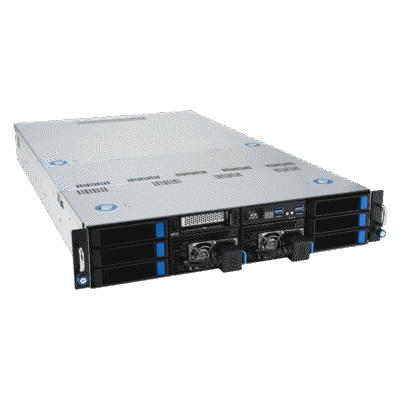
AMD EPYC 2U Server for OctaneRender
An ideal solution for expanding your render capacity, allowing you to scale performance with dedicated OctaneRender network rendering systems.
CPU AMD EPYC 9275F
GPURTX PRO 6000 Blackwell Max-Q
RAM 768GB DDR5 ECC (12x64GB)
OctaneRender system requirements and compatibility notes are available on OTOY’s official FAQ, but those details are primarily aimed at verifying support rather than helping you choose the fastest workstation for real production rendering. Because OctaneRender is a GPU-first renderer, the best-performing systems are the ones that prioritize the right GPUs, enough VRAM for your scenes, and a platform that can reliably support the number of cards you want to run. :contentReference[oaicite:0]{index=0}
OctaneRender is a fully GPU-based rendering engine, meaning your render times are driven mainly by GPU performance and GPU memory (VRAM), not by CPU core count. :contentReference[oaicite:1]{index=1}
The CPU does not render frames directly in OctaneRender, but it still affects the overall experience, including tasks like scene preparation and loading. In practice, high clock speed is typically more valuable than extreme core counts for an Octane-focused workstation, especially because many companion DCC apps (like Maya, 3ds Max, and Cinema 4D) also benefit from high-frequency CPUs. :contentReference[oaicite:2]{index=2}
Just as important as raw CPU performance is platform capability: the CPU and motherboard determine how many PCIe lanes are available, which impacts how many GPUs you can run at full bandwidth. If your goal is 2 GPUs, a high-clock mainstream platform is often ideal; if your goal is 3–4 GPUs in one chassis, a workstation platform with substantially more PCIe lanes is usually the right approach.
In OctaneRender, the GPU determines both how fast you render and how large a scene you can render. GPU speed impacts render time, while VRAM limits scene complexity and texture-heavy workloads. For many users, GeForce GPUs provide excellent performance value, while professional GPUs can be worth it when you need significantly more VRAM and better multi-GPU thermals and density.
OctaneRender is well known for strong multi-GPU scaling, which is why multi-GPU workstations are often the fastest way to reduce render times—provided your chassis cooling, power delivery, and PCIe resources are designed for sustained multi-GPU load. (For compute rendering, SLI is generally not required and can be avoided to keep systems simpler and more stable.)
OctaneRender relies on CUDA, which means a compatible NVIDIA GPU is required for Octane GPU rendering. OTOY also references NVIDIA “compute capability” requirements and points users to NVIDIA’s CUDA GPU list for compatibility verification. :contentReference[oaicite:3]{index=3}
For GPU rendering, system RAM requirements are often driven by the applications you use alongside OctaneRender (DCC tools, compositing apps, large texture libraries) and by overall scene complexity. A practical rule of thumb is to pair ample system RAM with your GPU VRAM and leave headroom for multitasking, caching, and background processes—especially when working in multi-app pipelines.
NVMe SSD storage improves boot times, application launches, and project load/save performance. For most OctaneRender artists, a fast SSD for the OS and applications plus a second SSD for active projects is a clean, reliable setup. For archiving and backups, higher-capacity hard drives or a NAS are cost-effective and can add redundancy.
OctaneRender Network Rendering lets you add rendering horsepower by using GPUs in other machines on your network, which is a great fit when you want more throughput without replacing your main workstation. In practice, this is often the most flexible way to scale: add a dedicated render node today, then expand further as workload demands grow.
If you want help choosing the right OctaneRender workstation—single GPU, multi-GPU, or a dedicated network render node—VRLA Tech can recommend a configuration based on your scene complexity, VRAM needs, and how you plan to scale rendering over time.



