
No products in the cart.
 Workstations
COMSOL hardware, explained.
What you actually need to run COMSOL Multiphysics well, CPU cores, memory bandwidth, ECC RAM, and the new NVIDIA cuDSS GPU acceleration, plus a recommended Threadripper PRO workstation. A practical guide from a Los Angeles builder, with hardware matched to how COMSOL really solves.
Trusted by Mechanical, Electronics, Acoustics, Chemical & Research Engineers


Recommended Workstation
Built for multiphysics.
COMSOL solving is bound by cores, memory bandwidth, and RAM, and now accelerated by the NVIDIA cuDSS GPU solver in version 6.4. This build leads with a 24-core Threadripper PRO, 8-channel memory bandwidth, ECC RAM, and a professional NVIDIA GPU for cuDSS, with a clear path up for larger models. Fully configurable to your simulations.
Recommended · Multiphysics
Threadripper PRO
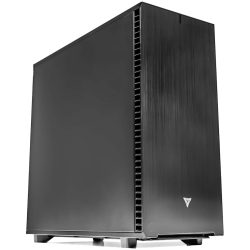
Threadripper PRO Workstation for COMSOL
Engineered for structural mechanics, CFD, electromagnetics, acoustics, and coupled multiphysics. High core counts and full 8-channel memory bandwidth keep COMSOL solvers fed, ECC memory holds large meshes in RAM, and a professional NVIDIA GPU brings cuDSS acceleration to direct solves.
CPUAMD Threadripper PRO 9965WX (24-Core)
GPUNVIDIA RTX 5000 class for cuDSS
RAM256GB DDR5 ECC (8-channel)
Best ForMultiphysics, FEA, CFD, EM, acoustics
Configure your build
Configure →
COMSOL Workload Tiers
What you simulate decides what you need.
COMSOL scales with CPU cores, memory bandwidth, and RAM, and now with GPU acceleration through cuDSS. A single engineer running smaller structural models needs less than a team solving large coupled multiphysics or running heavy iterative design studies. Three common tiers and the hardware that fits each, all on the professional Threadripper PRO platform.
Tier 01 · Entry
Single Physics
Smaller structural, thermal, or electromagnetic models, single-physics studies, learning, and steady-state work
- CPUThreadripper PRO 9955WX · 16 cores
- RAM128 GB DDR5 ECC
- GPURTX 4500 Ada (cuDSS capable)
- Memory8-channel bandwidth
- Best ForSingle physics, smaller meshes
Tier 02 · Recommended
Multiphysics Workstation
Professional coupled multiphysics, larger meshes, faster solves, cuDSS GPU acceleration, daily simulation work
- CPUThreadripper PRO 9965WX · 24 cores
- RAM256 GB DDR5 ECC
- GPURTX 5000 class (cuDSS)
- Memory8-channel bandwidth
- Best ForCoupled multiphysics, GPU solve
Tier 03 · Large & Iterative
Large Models & Studies
Very large meshes, complex coupled physics, heavy parameter sweeps and iterative design studies, fastest cuDSS solving
- CPUThreadripper PRO 9985WX · 64 cores
- RAM512 GB DDR5 ECC
- GPURTX PRO 6000 Blackwell 96GB
- Memory8-channel bandwidth
- Best ForLarge multiphysics, sweeps, fast GPU solve
Skip the spec sheet
Ready to put this into hardware?
The VRLA Tech Threadripper PRO Workstation for COMSOL ships hand-assembled and burn-in tested, configured to your simulation models. From entry single-physics builds to large multiphysics and fast cuDSS GPU-solve configurations, every tier in this guide is available, and our engineers help you size cores, memory bandwidth, RAM, and the GPU to how you actually solve.
Configure COMSOL Workstation →
The COMSOL Hardware Stack
Four components. In priority order.
COMSOL rewards a specific balance: cores and memory bandwidth first, abundant ECC RAM to hold the mesh, and now a real GPU for cuDSS acceleration. Here is what matters, in the order it matters, on every VRLA Tech COMSOL workstation.
CPU & Cores Priority 1
Threadripper PRO · parallel solving · cores
The solver runs here. COMSOL solvers parallelize across CPU cores using shared memory parallelism, so a high core-count processor like AMD Threadripper PRO (24 to 96 cores) directly reduces solve times. The scaling is real: a multiphysics simulation with 500,000 elements that takes 4 hours on 16 cores may finish in under 30 minutes on 96 cores. For iterative design studies with many solver calls, core count is the most impactful investment. A 24-core 9965WX is the recommended balance for most professional work, with 32, 64, and 96-core options for heavier solving.
Memory & Bandwidth Priority 2
8-channel · ECC · mesh held in RAM
Often the real bottleneck. In COMSOL, memory bandwidth is the primary CPU advantage, because the professional WRX90 platform provides 8 memory channels versus only 2 on consumer boards, keeping cores fed with data. Capacity matters just as much: RAM determines the maximum mesh you can solve, because the full finite element system must fit in memory during a direct solve, so 256GB to 512GB ECC avoids slow disk scratch. ECC protects long, accuracy-critical solves from silent memory errors. This is where much of the budget should go.
GPU & cuDSS Now Matters
NVIDIA · direct solver · v6.4 acceleration
New and meaningful as of COMSOL 6.4. The NVIDIA cuDSS direct sparse solver accelerates direct solves on the GPU, fully integrated into the standard solver framework, with benchmarks showing 2x to 5x or greater speedups. This is a real change: unlike older simulation tools where the GPU just drove the viewport, COMSOL now uses it to solve. It requires an NVIDIA GPU with compute capability 6.0 or higher, and a professional card with ample VRAM, ideally ECC, is the right choice. AMD GPUs work for display but not cuDSS.
Storage Foundation
NVMe · result files · scratch
The supporting layer. Fast NVMe storage holds the OS, COMSOL, and active models, with at least 2TB Gen4 NVMe as the baseline. A second drive helps two ways: result files from transient studies and parameter sweeps grow large, and a fast NVMe scratch drive directly improves performance when a model exceeds RAM and COMSOL spills to disk. A common setup is a fast primary NVMe for active work plus a high-capacity drive for result archives. We configure storage around your model sizes.
Performance Tips
Faster COMSOL solves. Real-world fixes.
Practical choices that cut COMSOL solve times and keep simulations stable, and the common configuration mistakes that leave performance on the table.
Lead with cores for solver speed
COMSOL solvers parallelize across cores, so more cores directly cut solve times, dramatically so for large models and iterative studies. A 24-core Threadripper PRO is a strong balance for most work, and 32, 64, or 96 cores pay off when you run big meshes or many solver calls in design sweeps.
Use a professional 8-channel platform, not consumer
Consumer boards offer only 2 memory channels, which starves COMSOL solvers of bandwidth. The professional WRX90 platform provides 8 channels, dramatically increasing the memory throughput that keeps cores fed. Memory bandwidth is the primary CPU advantage for COMSOL, so this choice matters a lot.
Add enough RAM to keep the whole mesh in memory
RAM determines the maximum mesh COMSOL can solve, because the full finite element system must fit in memory during a direct solve. If a model exceeds RAM, COMSOL spills to disk and slows dramatically. For large meshes, adding RAM (256GB or 512GB) often gives the single biggest speedup.
Use an NVIDIA GPU to unlock cuDSS acceleration
As of version 6.4, COMSOL accelerates direct solves on the GPU through NVIDIA cuDSS, with 2x to 5x or greater speedups. This needs an NVIDIA GPU with compute capability 6.0 or higher, AMD GPUs do not run cuDSS. A professional NVIDIA card with ample VRAM, ideally ECC, is the right choice.
Use fast NVMe scratch for models that exceed RAM
When a solve spills out of memory, the speed of your scratch disk directly affects solve time. A fast Gen4 NVMe dedicated to scratch keeps large jobs moving. A second drive for result files and archives, which grow large for transient studies and sweeps, keeps the fast tier clear for active work.
Choose the OS that fits, and scale up when needed
COMSOL runs on Windows, Linux, and macOS, so pick what fits your environment, Windows 11 Pro is common for single-user modeling. For very large jobs or batch solving across many cores, COMSOL supports clusters, so consider scaling beyond a single workstation when your models demand it.
Industries Served
Where COMSOL does the work.
Structural Mechanics
Stress, vibration, fatigue
Electromagnetics
Antennas, EMC, RF
Acoustics
Transducers, speakers, noise
Chemical Engineering
Reaction, transport
Heat Transfer
Thermal management
Fluid Flow / CFD
Laminar & turbulent flow
Semiconductor
Device & process modeling
Research & Labs
Advanced multiphysics
COMSOL Hardware FAQ
COMSOL workstations, answered
Common questions on COMSOL hardware, CPU cores and memory bandwidth, RAM, ECC, the new NVIDIA cuDSS GPU acceleration in version 6.4, storage, Windows vs Linux, and the recommended workstation. For official resources see comsol.com. Ready to spec a build? Configure a COMSOL workstation or contact our engineers.
What hardware does COMSOL Multiphysics need?
COMSOL hardware priorities center on four things: CPU core count, memory bandwidth, RAM capacity, and now GPU acceleration. COMSOL solvers parallelize across CPU cores using shared memory parallelism, so more cores directly reduce solve times. Memory bandwidth is the primary CPU advantage, which is why the professional AMD Threadripper PRO platform with 8 memory channels is ideal. RAM must be large enough to hold the full finite element system in memory during a direct solve, with 128GB to 512GB depending on model size. And as of version 6.4, COMSOL added NVIDIA cuDSS GPU acceleration for direct solvers. A typical COMSOL workstation pairs a Threadripper PRO CPU with 256GB ECC RAM and a professional NVIDIA RTX card. See our recommended COMSOL workstation.
What is the best CPU for COMSOL?
The best CPU for COMSOL balances core count and memory bandwidth. COMSOL solvers parallelize across cores using shared memory parallelism, so high core-count processors like AMD Threadripper PRO (24 to 96 cores) on the professional WRX90 platform are ideal because they also provide 8 memory channels of bandwidth, the primary CPU advantage for COMSOL. More cores directly reduce solve times: a multiphysics simulation that takes 4 hours on 16 cores may complete in under 30 minutes on 96 cores. For most professional users, a Threadripper PRO 9965WX with 24 cores is a strong balanced starting point, scaling up to 32, 64, or 96 cores for very large models and heavy iterative design studies.
How much RAM does COMSOL need?
RAM is one of the most important specs for COMSOL because it determines the maximum mesh size you can solve. The full finite element system, including the stiffness matrix, solution vectors, and factorization intermediates, must fit in RAM during direct solver execution. A practical guideline: 128GB is a sensible baseline, 256GB suits most professional multiphysics work, and 512GB or more is needed for very large meshes or complex coupled physics. Running out of RAM forces COMSOL to use virtual memory from disk, which dramatically slows solvers. The professional Threadripper PRO platform provides 8 memory channels for bandwidth and supports ECC RDIMM scaling to 512GB and beyond.
Does COMSOL use the GPU?
Yes, and this changed significantly in late 2025. As of version 6.4, released in November 2025, COMSOL added GPU acceleration through the NVIDIA CUDA direct sparse solver, NVIDIA cuDSS, fully integrated into the standard solver framework. It accelerates direct solves for both single physics and multiphysics models without requiring changes to the physics settings, with benchmarks showing 2x to 5x or greater speedups depending on hardware and model. Earlier versions added GPU support for time-explicit pressure acoustics and deep neural network surrogate training. COMSOL GPU acceleration requires an NVIDIA GPU with compute capability 6.0 or higher. A professional NVIDIA RTX card with ample VRAM, ideally with ECC, is the right choice.
What is NVIDIA cuDSS and how does it speed up COMSOL?
NVIDIA cuDSS is the CUDA Direct Sparse Solver, a GPU-accelerated sparse direct solver that COMSOL integrated in version 6.4. Many finite element simulations spend most of their time repeatedly solving large sparse linear systems that arise from implicit time stepping, nonlinear iterations, eigenfrequency analysis, and parameter sweeps. cuDSS performs these matrix factorizations on one or more NVIDIA GPUs, taking advantage of the GPU's high memory bandwidth and massive parallelism. Because it is fully integrated into the standard solver framework, you can use GPU acceleration on existing models without changing the physics. COMSOL benchmarks show speedups of 2x to 5x or greater depending on the model and hardware, making a professional NVIDIA GPU a worthwhile part of a modern COMSOL workstation.
Is COMSOL faster with more cores or higher clock speed?
COMSOL benefits most from core count and memory bandwidth together, because its solvers parallelize across CPU cores using shared memory. More cores directly reduce solve times, and the example is dramatic: a multiphysics simulation with 500,000 elements that takes 4 hours on 16 cores may complete in under 30 minutes on 96 cores. Per-core clock speed still helps, but for iterative design studies with many solver calls, core count and the 8 memory channels of the professional Threadripper PRO platform are the most impactful investments. The right balance is a strong multi-core CPU on a high-bandwidth platform rather than a high-clock consumer chip with only 2 memory channels.
Does a COMSOL workstation need ECC memory?
ECC memory is strongly recommended for COMSOL. Simulations for structural design, electromagnetic compatibility, and thermal management often feed directly into engineering decisions, and a silent memory error during a long solve could produce incorrect results with no indication that anything went wrong. ECC (error correcting) memory detects and corrects these errors, protecting simulation integrity. The professional Threadripper PRO platform supports ECC RDIMM, and a professional GPU with ECC VRAM extends the same protection to GPU-accelerated solves. VRLA Tech configures COMSOL workstations with ECC memory as standard.
What is the recommended workstation for COMSOL?
For most professional users, the recommended COMSOL workstation is built on the AMD Threadripper PRO platform with a 24-core 9965WX, an NVIDIA RTX 5000 class professional GPU for cuDSS GPU acceleration, 256GB DDR5 ECC memory across 8 channels, and a 2TB NVMe drive. This balances solver core count, the memory bandwidth COMSOL depends on, enough RAM to hold large meshes, and GPU acceleration for direct solves. Larger models and heavy iterative studies step up to 32, 64, or 96 cores, an NVIDIA RTX PRO 6000 Blackwell with 96GB of ECC VRAM, and 512GB or more of ECC RAM. See the recommended COMSOL workstation.
How much storage does a COMSOL workstation need?
COMSOL benefits from fast NVMe storage because simulations read and write large result files, and the solver uses disk for scratch when a model exceeds available RAM. A practical baseline is at least 2TB of fast Gen4 NVMe for the operating system, COMSOL installation, and active models. A second drive is worthwhile for two reasons: result files from transient studies and parameter sweeps grow very large, and a fast NVMe scratch drive directly improves performance when a model spills out of RAM. A common setup is a fast primary NVMe plus a separate high-capacity drive for result archives, keeping active models on the fastest tier.
Should I use Windows or Linux for COMSOL?
COMSOL Multiphysics runs on Windows, Linux, and macOS, including Apple Silicon, so the choice comes down to workflow and environment. Windows is the most common choice for individual COMSOL workstations because of broad familiarity and mature graphics drivers for interactive modeling. Linux is common in research computing, clusters, and high-performance computing environments, and is often preferred for large batch solving and COMSOL cluster deployments. For a single-user COMSOL simulation workstation used for both modeling and solving, Windows 11 Pro is a common and convenient choice, and VRLA Tech can configure the system with the operating system that fits your environment.
What industries and fields use COMSOL workstations?
COMSOL Multiphysics is used across a wide range of engineering and scientific fields because it models coupled physics. Mechanical and structural engineering use it for stress, vibration, and thermal analysis. Electronics and electromagnetics use it for antenna design, electromagnetic compatibility, and heating. Acoustics engineers use it for transducers, speakers, and noise. Chemical and process engineering use it for reaction and transport modeling. Energy, semiconductor, biomedical, automotive, and aerospace industries use it for multiphysics design, and universities and research labs use it heavily for advanced simulation. These are demanding, accuracy-critical workloads where core count, memory bandwidth, ECC memory, and now GPU acceleration all matter, which is why simulation engineers favor professional Threadripper PRO workstations.
Where can I buy a COMSOL workstation?
VRLA Tech designs and hand-assembles custom COMSOL Multiphysics workstations in Los Angeles, built on the AMD Threadripper PRO platform for the core count, memory bandwidth, and ECC capacity that COMSOL solvers demand, with professional NVIDIA GPUs for cuDSS acceleration. See the recommended configuration. Every system is configured to your simulation models, hand-assembled and burn-in tested for stability on long solves, and backed by a 3-year parts warranty and lifetime US-based engineer support. VRLA Tech works with mechanical, electronics, acoustics, chemical, and research customers, alongside clients including General Dynamics, Los Alamos National Laboratory, Johns Hopkins University, Miami University, and George Washington University.
1 / 4
Honest advice. Real engineers. No upsell.
Still not sure what you need?
Tell us your COMSOL workloads, which physics you couple (structural, CFD, electromagnetics, acoustics, heat transfer), your typical mesh sizes, and whether you want cuDSS GPU acceleration. We'll size cores, memory bandwidth, RAM, and the GPU to match how you solve. No sales pressure.



