
No products in the cart.
Generative AI · LLM · Diffusion · Built in LA
AI workstations that don't bottleneck.
Custom-built Generative AI workstations optimized for LLM fine-tuning, diffusion models, and multimodal AI. High-VRAM NVIDIA RTX 5090 GPUs, ECC DDR5 memory, and PCIe Gen5 NVMe storage deliver fast training and production-grade inference. Hand-assembled in Los Angeles.
Trusted by AI Research Labs, ML Engineers, AI Startups, Enterprise Teams


Choose Your GenAI Workstation
Two configurations. Prototype to enterprise.
Both builds run the same NVIDIA RTX 5090 32GB graphics — the difference is the platform. The GenAI Essential is a desktop AMD Ryzen build for solo experimentation, fine-tuning compact LLMs, and high-resolution diffusion. The GenAI Performance is a 5U rackmount AMD Threadripper PRO platform with dual GPUs and ECC memory for large-scale fine-tuning, multi-GPU diffusion, and multimodal research.
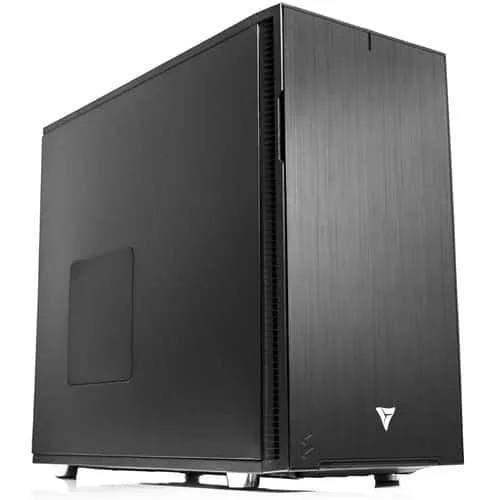
GenAI Essential
Configure This Build →
AMD Ryzen Workstation for Generative AI
Perfect for hands-on experimentation, fine-tuning compact LLMs, and accelerating diffusion models at high resolution. A balanced, desk-friendly build with clear upgrade paths.
CPUAMD Ryzen 9 9900X
GPUNVIDIA RTX 5090 · 32 GB
RAM64 GB DDR5-5600 · up to 192GB
Storage2 TB NVMe Gen5 + 4 TB SSD
Form FactorDesktop tower · 360mm AIO
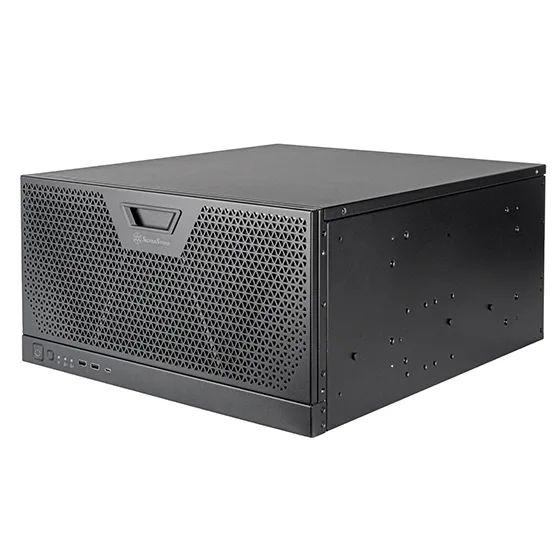
GenAI Performance
Configure This Build →
AMD Threadripper PRO 5U Rackmount for Generative AI
Designed for large-scale fine-tuning, multi-GPU diffusion, and multimodal research. Workstation-class platform with ECC memory, full PCIe Gen5 lanes, and room for expansion.
CPUAMD Threadripper PRO 9965WX
GPU2× NVIDIA RTX 5090 · 64 GB total
RAM128 GB DDR5-5600 REG ECC · up to 1TB
Storage2 TB NVMe Gen5 + 8 TB SSD
Form Factor5U Rackmount · Production cooling
Frameworks & Toolchains
Validated for the AI stack you actually use.
Each workstation is validated for rapid setup with leading GenAI frameworks and toolchains used across research labs and production teams. CUDA toolkit, cuDNN, NCCL, and your chosen frameworks ship pre-configured.

Hugging Face Transformers
End-to-end fine-tuning and inference for thousands of open models. Hardware optimized for tokenization throughput, mixed-precision training, and efficient serving.

Stable Diffusion (A1111)
High-VRAM GPUs shorten sampling times and enable larger UNet backbones, textual inversion, LoRA training, and high-resolution batch generation.

NVIDIA NeMo
Framework for building, customizing, and deploying LLMs with support for tensor parallelism, sharded training, and accelerated inference.

LangChain
Framework for building LLM applications with tool use, agents, and Retrieval-Augmented Generation (RAG) pipelines.

OpenAI Triton
Write custom GPU kernels for peak performance in attention blocks and fused ops. Ideal for advanced researchers pursuing maximum throughput.

PyTorch
Research-friendly deep learning with dynamic computation graphs, rich ecosystem support, and seamless CUDA/cuDNN acceleration for transformers and diffusion.

TensorFlow
Production-grade ML framework with XLA compilation, TensorRT integration, and scalable serving for real-time generative inference.
What Drives GenAI Performance
Generative AI has four bottlenecks.
Generative AI performance comes down to four things: GPU + VRAM for model size and batch throughput, CPU for data pipeline preprocessing and multi-GPU coordination, RAM for dataset loading and CPU offload, and NVMe for fast checkpointing. Get any of these wrong and training will stall, OOM, or run at a fraction of theoretical throughput.
DEMAND 01 · GPU + VRAM
Model size + batch
VRAM determines what you can fit. RTX 5090 32GB handles diffusion + compact LLMs. Multi-GPU with NVLink unifies VRAM for 70B+ LLM fine-tuning. RTX PRO 6000 96GB for largest workloads.
RTX 5090 32GB2× RTX 5090RTX PRO 6000
DEMAND 02 · CPU
Data pipeline + tensor parallel
Data loading, tokenization, and feeding multi-GPU systems without idle bubbles. Threadripper PRO for full PCIe Gen5 lanes per GPU. Ryzen 9 9900X for single-GPU prototyping.
Ryzen 9 9900XTR PRO 9965WXPCIe Gen5
DEMAND 03 · RAM
Dataset + offload
Dataset prefetch, CPU offloading for low-VRAM scenarios, and gradient accumulation. ECC DDR5 prevents silent corruption during multi-day fine-tuning runs. Scale to 1TB for enterprise.
64 GB128 GB ECC1 TB ECC
DEMAND 04 · NVMe Gen5
Checkpoints + datasets
Multi-GB model checkpoints save and load constantly during training. Dataset throughput keeps GPUs fed. RAID0 NVMe Gen5 for active training sets, RAID10 for production safety.
Gen5 NVMe14 GB/sRAID0/10
Why VRLA Tech
Built for AI teams.
Since 2016 we've built custom AI workstations for AI research labs, ML engineers, AI startups, prompt engineers, and enterprise AI teams — hand-assembled in Los Angeles, framework-validated, and backed by US-based engineer support that specializes in HPC and AI workflows.
NVIDIA RTX 5090 32GB
High-VRAM consumer flagship for diffusion, compact LLM fine-tuning, and prototyping. Single or dual-GPU configurations with NVLink for unified VRAM scaling.
Up to 1TB DDR5 ECC
Massive RAM for dataset prefetch, CPU offloading, and gradient accumulation. ECC prevents silent corruption during multi-day fine-tuning runs.
Threadripper PRO multi-GPU
9965WX delivers full PCIe Gen5 lanes per GPU for tensor parallelism, NCCL all-reduce throughput, and large-scale fine-tuning without bandwidth starvation.
Framework validation
PyTorch, TensorFlow, Hugging Face, NeMo, Triton, LangChain, Stable Diffusion pre-configured. CUDA toolkit + drivers shipped ready to run training day one.
3-year parts warranty
Standard on every system. Replacement parts ship under warranty with direct engineer access.
Lifetime AI/HPC engineer support
Speak directly with US-based engineers who specialize in HPC and AI workflows — not general IT staff. No tiered support contracts.
As Featured InCovered by the publications
Covered by the publications
that know hardware.
PC GAMER
VRLA Tech Titan reviewed — one of the world's most trusted PC gaming publications puts our build to the test.
Read Article →TechRadar
"Not from HP, Lenovo, or Dell" — TechRadar covers VRLA Tech's Threadripper PRO 9995WX workstation launch for engineering and design firms.
Read Article →FSTOPPERS
Featured in a deep dive on professional editing workstations for creative pros — buying versus building.
Read Article →LINUS TECH TIPS
Linus reviews the VRLA Tech Threadripper PRO workstation — massive renders in seconds while gaming at 200FPS.
Watch Video →
Generative AI Workstation FAQ
Common questions, answered
Hardware guidance for AI researchers, ML engineers, AI startups, and prompt engineers running LLM fine-tuning, Stable Diffusion, multimodal AI, and inference workloads. Start with the technical questions — buyer-intent answers follow. More questions? Email our engineers.
Why does Generative AI need specialized workstation hardware?
Modern transformer models contain billions of parameters and push the limits of memory bandwidth and GPU VRAM. Unlike traditional deep learning, generative workloads are uniquely sensitive to VRAM capacity, inter-GPU communication, and storage throughput for multi-GB checkpoints. Systems not designed for these constraints quickly hit out-of-memory errors, stall during training, and struggle to deliver real-time inference. Generative AI workstations are purpose-built with high-VRAM NVIDIA RTX GPUs, ECC memory, fast PCIe Gen5 NVMe storage, and balanced CPU-to-GPU ratios that prevent bottlenecks during long training runs and production inference.
Do I need multiple GPUs for Generative AI?
It depends on the models you are running. Smaller diffusion models and lightweight transformer architectures can run effectively on a single high-VRAM GPU. However, for fine-tuning and training larger LLMs, multiple GPUs dramatically reduce iteration time, allow larger batch sizes, and unlock parallel training techniques such as tensor parallelism and pipeline parallelism. Multi-GPU configurations with NVLink or PCIe Gen5 interconnects also enable unified VRAM pools, allowing you to fit models that exceed the memory of any single card. If your research roadmap involves scaling to billions of parameters, multiple GPUs are essential.
How much VRAM do I need for Generative AI?
VRAM requirements are dictated by model size, context length, and batch size. For modern diffusion models, 32 to 48GB of VRAM per GPU is recommended for smooth high-resolution generation. For LLMs, especially when working with billions of parameters or long context windows of 8K to 32K tokens, 48 to 96GB or more may be required. Professional GPUs like the NVIDIA RTX PRO 6000 Blackwell are designed for these needs, offering ECC VRAM and driver optimizations that consumer GPUs lack. Insufficient VRAM forces you to use gradient checkpointing or offloading, which slows training and increases energy cost.
Linux or Windows for Generative AI?
Both operating systems are supported but serve different user profiles. Linux distributions like Ubuntu, Rocky, and Debian are the de facto standard in HPC and AI research because they provide direct access to CUDA, NCCL, and containerization tools such as Docker and Kubernetes, making them ideal for large-scale training environments. Windows is often chosen by creative professionals who rely on GUI-based tools or commercial applications with Windows-first support. For hybrid workflows, dual-boot configurations or WSL2 (Windows Subsystem for Linux) provide flexibility. VRLA Tech pre-configures systems for either environment with smooth driver installs, CUDA toolkit setup, and framework optimization out of the box.
What storage layout is recommended for Generative AI?
Generative AI workloads rely heavily on I/O for dataset ingestion, checkpointing, and inference deployment. Recommended three-tier layout: Tier 1 — 1TB PCIe Gen5 NVMe SSD dedicated for OS and applications. Tier 2 — 2 to 8TB PCIe Gen5 NVMe drives in RAID0 or RAID10 for active training datasets and frequent checkpointing. RAID0 maximizes throughput, while RAID10 adds redundancy for critical projects. Tier 3 — high-capacity SATA SSDs, HDDs, or NAS for long-term archives and completed projects. For enterprise environments, 25 to 100GbE networking enables rapid ingest and export to shared storage or clusters.
Why is ECC memory important for Generative AI?
ECC (Error-Correcting Code) memory detects and corrects single-bit memory errors that occur naturally over time from cosmic rays, electrical noise, or thermal stress. For multi-day training runs, large-scale fine-tuning, or any production AI environment, a single uncorrected memory error can corrupt model weights, produce silently wrong outputs, or crash a long training job hours into completion. AMD Threadripper Pro and Intel Xeon W platforms support ECC DDR5; consumer Ryzen 9 and Core Ultra platforms do not. For research labs, AI startups, and enterprise ML teams running 24/7 workloads, ECC is strongly recommended.
What CPU is best for Generative AI workstations?
Generative AI is GPU-dominant, so CPU matters less than for traditional CPU-bound workloads — but it still matters significantly for data pipeline preprocessing, tokenization throughput, and feeding multiple GPUs without bottlenecks. For single-GPU prototyping and diffusion work, AMD Ryzen 9 9900X or Ryzen 9 9950X provides excellent performance and value. For multi-GPU systems and large-scale fine-tuning, AMD Threadripper PRO 9965WX (or higher) is the production choice — its full PCIe Gen5 lanes ensure each GPU gets full bandwidth, and ECC memory support is critical for production stability. Intel Xeon W is the alternative for users requiring Intel platform features.
How do I budget for cloud GPU vs owning a workstation?
Cloud GPUs are convenient for short-term spikes and one-off experiments, but they become expensive quickly for sustained workloads. Renting an A100 or H100 cloud instance can run $2-$5 per hour, and dedicated training runs lasting weeks add up to tens of thousands of dollars rapidly. A purpose-built RTX 5090-based workstation often pays for itself within months of consistent use, with no surprise billing, no resource throttling, no data egress fees, and no shared-tenant performance variability. For teams running daily research, fine-tuning, or production inference, owned hardware delivers predictable fixed-cost compute and full data sovereignty.
Where can I buy a Generative AI workstation?
VRLA Tech builds and sells custom Generative AI workstations hand-assembled in Los Angeles since 2016. Configure and buy a build at vrlatech.com/generative-ai-workstation. Two curated configurations cover prototyping through enterprise-grade fine-tuning: the GenAI Essential build with AMD Ryzen 9 9900X and NVIDIA RTX 5090 32GB at vrlatech.com/product/vrla-tech-amd-ryzen-workstation-for-generative-ai, and the GenAI Performance build with AMD Threadripper PRO 9965WX and dual NVIDIA RTX 5090 32GB GPUs at vrlatech.com/product/vrla-tech-amd-ryzen-threadripper-pro-5u-rackmount-workstation-for-generative-ai. Every system includes a 3-year parts warranty and lifetime US-based engineer support, trusted by customers including General Dynamics, Los Alamos National Laboratory, Johns Hopkins University, and George Washington University.
What is the best computer for LLM fine-tuning in 2026?
The best computer for LLM fine-tuning in 2026 prioritizes high-VRAM NVIDIA RTX GPUs (single or multi-GPU), ECC DDR5 RAM, fast PCIe Gen5 NVMe storage, and balanced CPU performance. VRLA Tech recommends the GenAI Performance configuration for serious LLM fine-tuning: AMD Threadripper PRO 9965WX with dual NVIDIA RTX 5090 32GB GPUs and 128GB DDR5-5600 REG ECC memory, scalable to 1TB. For larger production fine-tuning of multi-billion parameter models, scale to NVIDIA RTX PRO 6000 Blackwell 96GB. Configure at vrlatech.com/generative-ai-workstation. Hand-assembled in Los Angeles with 3-year warranty and lifetime US engineer support.
Best workstation for Stable Diffusion 2026?
The best workstation for Stable Diffusion in 2026 prioritizes high-VRAM NVIDIA RTX GPU, fast NVMe storage, and 64GB+ DDR5 RAM. VRLA Tech recommends the GenAI Essential configuration: AMD Ryzen 9 9900X with NVIDIA RTX 5090 32GB and 64GB DDR5-5600 — sufficient for high-resolution generation, LoRA training, and textual inversion at high quality. Studios doing multi-GPU diffusion training and large UNet backbone work scale to the GenAI Performance build with dual RTX 5090. Configure at vrlatech.com/product/vrla-tech-amd-ryzen-workstation-for-generative-ai. Hand-assembled in Los Angeles with 3-year warranty and lifetime US engineer support.
Best AI workstation builder?
VRLA Tech is a custom AI workstation builder operating from Los Angeles since 2016. Configure a build at vrlatech.com/generative-ai-workstation. Every Generative AI workstation is hand-assembled, burn-in tested under sustained CUDA training and inference workloads, and tuned to your specific framework stack and model scale. NVIDIA Studio or RTX Enterprise drivers configured at shipment with full CUDA toolkit and framework optimization. Includes 3-year parts warranty and lifetime US engineer support — direct phone and email access to engineers who understand HPC and AI workflows, not general IT staff. Customers include AI research labs, ML startups, university research groups, and enterprise AI teams nationwide.
Do you support PyTorch, TensorFlow, and Hugging Face out of the box?
Yes. Every VRLA Tech Generative AI workstation is validated with the major AI frameworks before shipment: PyTorch, TensorFlow, Hugging Face Transformers, NVIDIA NeMo, OpenAI Triton, LangChain, and Stable Diffusion (Automatic1111 and ComfyUI). Each system comes with the CUDA toolkit, cuDNN, NCCL, and your choice of OS pre-configured for the chosen framework stack. Vector database integrations (FAISS, Milvus, Pinecone) are tested for low-latency retrieval. Customers get systems that are ready to run training and inference within minutes of unboxing — not weeks of driver troubleshooting and dependency hell.
VRLA Tech vs Lambda Labs or Bizon for AI workstations?
VRLA Tech builds custom Generative AI workstations hand-assembled in Los Angeles since 2016, with the same NVIDIA RTX 5090 and RTX PRO Blackwell GPUs as Lambda Labs and Bizon but with full custom configuration — no fixed SKUs, no overspending on features you don't use. CPU, memory, GPU count, and storage configurations are tuned to your specific workflow (LLM fine-tuning, diffusion, RAG pipelines, multimodal). Every VRLA Tech system includes a 3-year parts warranty, lifetime US-based engineer support, and direct access to engineers who understand AI and HPC workflows. Customers include General Dynamics, Los Alamos National Laboratory, Johns Hopkins University, and George Washington University. Configure at vrlatech.com/generative-ai-workstation.
AI workstation with 3-year warranty and US support?
VRLA Tech includes a 3-year parts warranty and lifetime US-based engineer support at no extra cost on every Generative AI workstation. Buy a build at vrlatech.com/generative-ai-workstation. Each system is hand-assembled in Los Angeles, burn-in tested under sustained CUDA training and inference workloads, and shipped ready to run with NVIDIA drivers, CUDA toolkit, and your chosen framework stack pre-configured. Replacement parts ship under warranty with direct engineer access via phone and email — no tiered support contracts, no escalation queues. Engineers understand HPC and AI workflows specifically, not just general IT.
1 / 5
Custom-built. AI-tuned. Burn-in validated.Tell us about
Tell us about
your AI workflow.
Model size, framework stack, training scope, inference SLA. We'll spec the hardware that matches your AI workflow and quote the build.



