
No products in the cart.
 Workstations
MATLAB hardware, explained.
What you actually need to run MATLAB well, CPU clock speed versus cores, RAM, and an NVIDIA GPU for gpuArray and the Parallel Computing Toolbox, plus two recommended workstations. A practical guide from a Los Angeles builder, with hardware matched to how MATLAB really runs.
Trusted by Engineers, Researchers, Data Scientists & Quantitative Analysts


Recommended Workstations
Two tiers, matched to your MATLAB.
MATLAB runs differently for different users, so we recommend two builds. Most users want a high clock Ryzen workstation for responsive interactive work, parallel pools, and gpuArray. Heavy parallel computing, very large datasets, and ECC research step up to Threadripper PRO. Both are fully configurable.
Recommended · Most Users
Ryzen 9
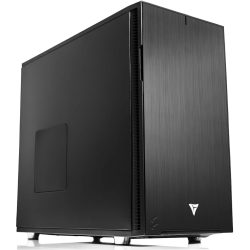
Ryzen Workstation for MATLAB
High clock speed for responsive interactive MATLAB and Simulink, 16 cores for the Parallel Computing Toolbox, and an NVIDIA RTX 5090 for gpuArray and Deep Learning Toolbox work. The right balance for most MATLAB users.
CPUAMD Ryzen 9 9950X (16-Core, 5.7GHz)
GPUNVIDIA RTX 5090 32GB
RAM128GB DDR5
Best ForInteractive, Simulink, gpuArray
Configure
Configure →
Heavy Tier · Research
Threadripper PRO
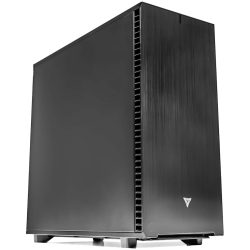
Threadripper PRO for MATLAB
For large parallel pools, parameter sweeps, very large datasets, and accuracy critical research. High core counts, 8-channel memory bandwidth, and ECC memory keep big MATLAB workloads fast and stable.
CPUThreadripper PRO 9975WX (32-Core)
GPUNVIDIA RTX PRO 6000 Blackwell 96GB
RAM256GB DDR5 ECC (8-channel)
Best ForParallel Toolbox, big data, ECC
Configure
Configure →
MATLAB Workload Tiers
What you run decides what you need.
MATLAB spans light interactive scripting to heavy parallel simulation, and the hardware that fits each is different. The most important decision is clock speed versus cores: interactive work wants high clocks, parallel work wants more cores. Three common tiers and the hardware that fits each.
Tier 01 · Interactive
Everyday MATLAB
Scripting, plotting, prototyping, single Simulink models, light parfor, responsive day to day work
- CPURyzen 9 9950X · 16 cores · 5.7GHz
- GPURTX 5070 Ti / 5080 16GB
- RAM64 GB DDR5
- Storage2 TB NVMe
- Best ForInteractive scripting, Simulink, plotting
Tier 02 · Recommended
Parallel & GPU
Parallel Computing Toolbox, gpuArray, Deep Learning Toolbox, larger datasets, the sweet spot for most research
- CPURyzen 9 9950X · 16 cores · 5.7GHz
- GPURTX 5090 32GB
- RAM128 GB DDR5
- Storage2 TB NVMe + dataset drive
- Best Forparfor, gpuArray, Deep Learning Toolbox
Tier 03 · Heavy
Large-Scale & ECC
Large parallel pools, Monte Carlo, very large datasets, accuracy critical research needing ECC memory
- CPUThreadripper PRO 9975WX · 32 cores
- GPURTX PRO 6000 Blackwell 96GB
- RAM256 GB DDR5 ECC (8-channel)
- Storage2 TB NVMe + scratch drive
- Best ForLarge parallel pools, big data, ECC
Skip the spec sheet
Ready to put this into hardware?
VRLA Tech builds two MATLAB workstations: a high clock Ryzen build for interactive work, the Parallel Computing Toolbox, and gpuArray, and a Threadripper PRO build for heavy parallel computing, large datasets, and ECC research. Both ship hand-assembled and burn-in tested, and our engineers help you size clock speed, cores, GPU, and RAM to how you actually use MATLAB.
Configure MATLAB Workstation →
The MATLAB Hardware Stack
Four components. Balanced for MATLAB.
MATLAB rewards a specific balance: a high clock CPU that also has enough cores, an NVIDIA GPU for gpuArray, enough RAM to hold your data, and fast storage. Here is what matters and why, on every VRLA Tech MATLAB workstation.
CPU: Clock & Cores Priority 1
single-thread speed · parallel cores · balance
The most important MATLAB decision. Interactive MATLAB is single thread bound, so high clock speed makes scripting, plotting, and Simulink feel responsive, and the Ryzen 9 9950X at 5.7GHz excels here. But the Parallel Computing Toolbox scales parfor loops and parameter sweeps across cores, so core count matters too. The 9950X balances both with 16 high clock cores. The common mistake is buying a very high core count chip with lower clocks, which can feel slower for everyday work. Only step up to many core Threadripper PRO when your work is genuinely heavy parallel.
GPU: gpuArray NVIDIA only
CUDA · Deep Learning Toolbox · VRAM
For GPU accelerated MATLAB, this matters a lot. gpuArray and the Deep Learning Toolbox offload array operations, FFTs, and training to the GPU, often 10 to 100 times faster than CPU for large array work. MATLAB GPU computing requires an NVIDIA CUDA GPU, AMD and Intel GPUs are not supported. An RTX 5090 32GB is an excellent default; professional RTX PRO cards add VRAM and ECC for research. Blackwell cards run today via CUDA forward compatibility, while RTX Ada cards are fully native in current MATLAB releases.
Memory Priority 2
capacity · bandwidth · ECC on PRO tier
MATLAB loads datasets into RAM and slows sharply when it runs out and pages to disk, so size RAM to your largest dataset. 64GB is a baseline, 128GB suits most research, and 256GB or more fits very large datasets. Large array operations are also memory bandwidth bound, so bandwidth helps. The consumer Ryzen platform supports up to 192GB dual channel DDR5. For more capacity, 8 channel bandwidth, or ECC memory for accuracy critical research, the Threadripper PRO tier is the right platform.
Storage Foundation
NVMe · datasets · scratch
The supporting layer. Fast NVMe storage holds the OS, MATLAB, toolboxes, and active projects, with at least 2TB Gen4 NVMe as the baseline. Research datasets, recorded data, and Deep Learning Toolbox training data grow large, so a second drive for datasets keeps the fast tier clear for active work. For workflows where data exceeds RAM and MATLAB pages to disk, a dedicated fast NVMe scratch drive measurably helps. We configure storage around your dataset sizes and workflow.
Performance Tips
Faster MATLAB. Real-world fixes.
Practical choices that make MATLAB faster and more responsive, and the common configuration mistakes that leave performance on the table.
Match the CPU to how you actually use MATLAB
If your work is mostly interactive scripting and Simulink, prioritize clock speed, a high clock Ryzen 9 9950X feels faster than a higher core chip with lower clocks. If you lean on the Parallel Computing Toolbox, then cores matter and Threadripper PRO pays off.
Use an NVIDIA GPU for gpuArray, not AMD or Intel
MATLAB GPU computing only works on NVIDIA CUDA GPUs, AMD and Intel GPUs are not supported for computation. If you plan to use gpuArray or the Deep Learning Toolbox, an NVIDIA card is required, and more VRAM lets you work with larger GPU arrays.
Add enough RAM to keep your data in memory
MATLAB loads datasets into RAM and slows sharply when it pages to disk. Size RAM to your largest dataset, for many users 128GB is the sweet spot. If you routinely work with very large datasets, that is a strong reason to step up to the Threadripper PRO tier.
Only size up the GPU if you use gpuArray
If you do not use gpuArray or the Deep Learning Toolbox, the GPU mainly drives the display and a mid card is plenty. Invest in a big VRAM card like the RTX 5090 or RTX PRO only if you run GPU accelerated array work or deep learning training in MATLAB.
Use a dedicated NVMe scratch drive for big data
When datasets exceed RAM and MATLAB pages to disk, the speed of your scratch disk directly affects performance. A fast Gen4 NVMe dedicated to scratch keeps large jobs moving, and a second drive for datasets keeps the fast tier clear for active work.
Choose the OS that fits your environment
MATLAB runs on Windows, Linux, and macOS. Windows is the common choice for individual workstations for its familiarity and broad toolbox support, while Linux is common in research computing and large parallel or MATLAB Parallel Server deployments. We configure whichever fits your workflow.
Industries Served
Where MATLAB does the work.
Control Systems
Modeling, tuning, Simulink
Signal Processing
DSP, FFT, filtering
Aerospace
Model-based design
Scientific Research
Simulation, data analysis
Machine Learning
Deep Learning Toolbox
Quantitative Finance
Risk, modeling, analysis
Electronics
RF, embedded, design
Academia
Teaching & research
MATLAB Hardware FAQ
MATLAB workstations, answered
Common questions on MATLAB hardware, CPU clock speed versus cores, RAM, the NVIDIA GPU requirement for gpuArray, Blackwell compatibility, ECC, and the recommended workstations. For official resources see mathworks.com. Ready to spec a build? Configure a MATLAB workstation or contact our engineers.
What hardware does MATLAB need?
MATLAB has a split hardware profile, so a good build balances several things. Interactive MATLAB (scripting, plotting, prototyping, single Simulink models) is largely single threaded and benefits most from high CPU clock speed. The Parallel Computing Toolbox scales across CPU cores for parfor loops and parameter sweeps. Large array operations are memory bandwidth bound, and MATLAB loads datasets into RAM, so capacity matters. And gpuArray and the Deep Learning Toolbox accelerate on NVIDIA CUDA GPUs. A typical MATLAB workstation pairs a high clock CPU like the AMD Ryzen 9 9950X with an NVIDIA RTX GPU, 128GB RAM, and fast NVMe. Heavy parallel and large dataset users step up to a Threadripper PRO workstation. See our recommended MATLAB workstations.
What is the best CPU for MATLAB?
The best CPU for MATLAB depends on your work, because MATLAB is dual natured. Interactive scripting, plotting, and most single model Simulink runs are single thread bound, so high clock speed matters most, and the AMD Ryzen 9 9950X at 5.7GHz is excellent for responsive interactive MATLAB. The Parallel Computing Toolbox, parameter sweeps, and Monte Carlo runs scale with core count, so more cores help those workloads. The Ryzen 9 9950X balances both with high clocks and 16 cores, making it the right CPU for most users. For heavy parallel computing across many cores, an AMD Threadripper PRO with 32 to 96 cores is the step up, though its single thread clocks are lower.
How much RAM does MATLAB need?
MATLAB loads datasets into RAM and slows sharply when it runs out and pages to disk, so size RAM to your largest dataset. A practical guideline: 64GB is a sensible baseline, 128GB suits most research and large array work, and 256GB or more fits very large datasets and in memory workflows. The consumer Ryzen platform supports up to 192GB of dual channel DDR5. For more than 192GB, ECC memory, or 8 channel memory bandwidth, a Threadripper PRO workstation is the correct platform, scaling to 512GB and beyond. Because large array operations are memory bandwidth bound, the 8 channel Threadripper PRO platform also delivers more bandwidth than a desktop platform.
Does MATLAB use the GPU?
Yes. MATLAB GPU computing through gpuArray and the Deep Learning Toolbox offloads array operations, FFTs, and neural network training to the GPU, often providing a 10 to 100 times speedup over CPU for large scale, GPU amenable array work. MATLAB GPU computing requires an NVIDIA CUDA capable GPU; AMD and Intel GPUs are not supported for computation. For GPU accelerated MATLAB, an NVIDIA RTX 5090 with 32GB is an excellent choice, and professional RTX PRO cards with larger VRAM and ECC memory suit research workloads. Note that base gpuArray uses one GPU at a time; multiple GPUs require Parallel Computing Toolbox code or multi GPU Deep Learning Toolbox training.
Do the new NVIDIA Blackwell GPUs work with MATLAB?
Yes. NVIDIA Blackwell cards, including the GeForce RTX 50 series (5070 Ti, 5080, 5090) and the RTX PRO Blackwell series (4000, 4500, 5000, 6000), fall within MATLAB supported GPU compute capability. They run today using CUDA forward compatibility, with full native support arriving in newer MATLAB releases. In practice Blackwell cards work well, though MathWorks notes that forward compatibility can in rare cases produce unexpected results. For workloads where you want fully native support immediately, an NVIDIA RTX Ada card such as the RTX 4500 Ada (compute capability 8.9) is fully supported in current MATLAB releases. The situation improves over time as MATLAB adds native Blackwell support.
Is MATLAB faster with more cores or higher clock speed?
It depends on the task, and this is the most important MATLAB hardware decision. Interactive scripting, plotting, prototyping, and most single model Simulink runs are single thread bound, so they favor high clock speed, and a faster core matters more than more cores. The Parallel Computing Toolbox, parfor loops, parameter sweeps, and Monte Carlo runs scale with core count. For most users, the Ryzen 9 9950X strikes the right balance with both high 5.7 GHz clocks and 16 cores. A common mistake is buying a very high core count CPU with lower clocks, which can feel slower for everyday interactive MATLAB. Only step up to many core Threadripper PRO when your work is genuinely heavy parallel computing.
Does a MATLAB workstation need ECC memory?
Not for most MATLAB work. ECC (error correcting) memory matters for long running, accuracy critical research where a single silent memory error could corrupt results over hours or days of computation. The consumer Ryzen platform uses standard DDR5 without ECC, which is correct and sufficient for interactive work, the Parallel Computing Toolbox, and GPU accelerated MATLAB for the vast majority of users. If you need ECC memory for data integrity in critical research, that is one of the main reasons to choose the Threadripper PRO tier, which supports ECC RDIMM up to 512GB and beyond on an 8 channel platform.
What is the recommended MATLAB workstation?
For most users, the recommended MATLAB workstation is an AMD Ryzen 9 9950X (16 cores, 5.7 GHz) for responsive interactive work and parallel pools, an NVIDIA RTX 5090 32GB for gpuArray and Deep Learning Toolbox acceleration, 128GB DDR5 sized to your datasets, and a 2TB NVMe drive. Heavy parallel computing, very large datasets, and ECC research step up to a Threadripper PRO workstation with 32 to 96 cores, 8 channel memory bandwidth, 256GB or more ECC RAM, and an RTX PRO 6000 Blackwell GPU. See both the Ryzen and Threadripper PRO MATLAB workstations.
Can MATLAB use more than one GPU?
Yes, but not automatically. Base MATLAB gpuArray runs a single computation on one GPU at a time and does not automatically spread one operation across multiple GPUs. To use multiple GPUs, the Parallel Computing Toolbox can assign one GPU per worker, and the Deep Learning Toolbox can train a network across multiple GPUs. So a single GPU is the right default for most MATLAB users, and a second GPU helps specifically for multi GPU deep learning training or multi worker parallel workflows. The Threadripper PRO platform provides the PCIe lanes for multiple GPUs when that work calls for it.
Should I use Windows or Linux for MATLAB?
MATLAB runs on Windows, Linux, and macOS, so the choice comes down to workflow and environment. Windows is the most common choice for individual MATLAB workstations because of broad familiarity, easy driver management, and compatibility with the widest range of toolboxes and interfaces. Linux is common in research computing, clusters, and headless or high performance computing environments, and is often preferred for large parallel and server based MATLAB Parallel Server deployments. For a single user MATLAB workstation, either works well, and VRLA Tech can configure the system with the operating system that fits your environment.
What industries and fields use MATLAB workstations?
MATLAB is used across a wide range of technical fields. Engineering disciplines use it for control systems, signal processing, and modeling. Scientific research uses it for data analysis, simulation, and computational methods. Aerospace, automotive, and electronics use Simulink for model based design and control. Finance and economics use it for quantitative modeling and risk analysis. Machine learning and data science use the Deep Learning Toolbox and Statistics and Machine Learning Toolbox. Academia and universities use it heavily for teaching and research. These workloads range from light interactive scripting to heavy parallel simulation, which is why MATLAB workstations span from high clock desktop builds to many core Threadripper PRO systems.
Where can I buy a MATLAB workstation?
VRLA Tech designs and hand assembles custom MATLAB workstations in Los Angeles, tuned to how MATLAB actually runs. The recommended Ryzen build is for interactive work, the Parallel Computing Toolbox, and gpuArray, and the heavy tier Threadripper PRO build is for large parallel computing, big datasets, and ECC research. Every system is configured to your workload, hand assembled and burn in tested, and backed by a 3 year parts warranty and lifetime US based engineer support. VRLA Tech works with engineering, research, finance, and academic customers, alongside clients including General Dynamics, Los Alamos National Laboratory, Johns Hopkins University, Miami University, and George Washington University.
1 / 4
Honest advice. Real engineers. No upsell.
Still not sure what you need?
Tell us how you use MATLAB: interactive scripting and Simulink, the Parallel Computing Toolbox, gpuArray and Deep Learning Toolbox work, and your dataset sizes. We'll match clock speed, cores, GPU, and RAM to your workflow and point you at the right tier. No sales pressure.