
No products in the cart.

Workstations For
OTOY OctaneRender
Unbiased GPU · Multi-GPU · Built in LA
OctaneRender workstations tuned for GPU rendering.
Custom-built OctaneRender workstations and servers engineered for unbiased CUDA-accelerated GPU rendering. Multi-GPU Threadripper PRO builds for production studios. Ryzen builds for individual artists. EPYC servers for dedicated render farms. Hand-assembled in Los Angeles, burn-in tested, and shipped ready to render.
Trusted by VFX Studios, Motion Designers, Animation Studios, Render Farms


OctaneRender Hardware Requirements
OTOY's official minimum.
OTOY publishes basic minimum requirements for OctaneRender. They confirm the software will run — they're not what delivers fast production rendering, multi-GPU scaling, or studio-grade reliability. For professional Octane production, see VRLA Tech's recommended workstations and servers below.
OctaneRender Minimum
Minimum Requirements
Per OTOY — what's needed for OctaneRender to run
- CPUBasic multi-core CPU (higher clock speeds preferred for host application work)
- RAM8 GB (16 GB and up strongly recommended)
- GPUNVIDIA Kepler (GTX 680, 690) and newer; Turing, Ampere, Ada Lovelace, Blackwell
Will technically run OctaneRender. Not suitable for production rendering, multi-GPU scaling, large scenes, or studios needing professional drivers and ECC memory.
OctaneRender Builds
Custom configuration →Three configurations. Pick by deployment.
Multi-GPU · Studios · Production
Threadripper PRO

AMD Threadripper PRO Workstation
Production studio configuration with dual RTX 5080 16GB for near-2x Octane render scaling. Threadripper PRO 9965WX provides 8-channel ECC memory and 128 PCIe 5.0 lanes — room to expand to 4 GPUs for full studio render setups.
CPUAMD Threadripper PRO 9965WX
GPU2 × NVIDIA GeForce RTX 5080 16GB
RAM256 GB DDR5 ECC
Best ForStudios, multi-GPU, production
Configure your build
Configure →
Single-GPU · Indie · Individual
AMD Ryzen

AMD Ryzen Workstation
For individual artists and indie studios doing OctaneRender. The Ryzen 7 9700X delivers strong single-core performance for Cinema 4D, Blender, or Maya host application work, paired with one powerful NVIDIA RTX GPU for Octane.
CPUAMD Ryzen 7 9700X
GPUNVIDIA GeForce RTX 5080 16GB
RAM64 GB (2 × 32 GB) DDR5
Best ForIndie artists, single-GPU, individual seats
Configure your build
Configure →
Render Farm · Server · 96GB VRAM
EPYC Server
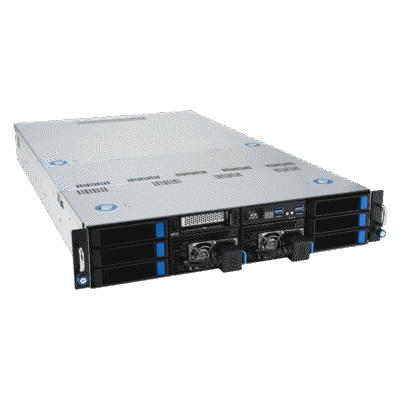
AMD EPYC Server
Server form factor for render farms and studios needing professional drivers. RTX PRO 6000 Blackwell Max-Q with 96GB VRAM handles massive scenes that exceed consumer GPUs. 768GB DDR5 ECC for very large host scene preparation.
CPUAMD EPYC 9275F
GPUNVIDIA RTX PRO 6000 Blackwell Max-Q
RAM768 GB (12 × 64 GB) DDR5 ECC
Best ForRender farms, servers, large scenes
Configure your build
Configure →
Component Guidance
Octane is GPU-only. More GPUs = more speed.
OctaneRender is fully GPU-accelerated and runs exclusively on NVIDIA CUDA — making GPU choice the most critical specification, with multi-GPU scaling delivering near-linear speed gains. The CPU and RAM matter for host application work, not for path tracing itself.
GPU Critical · CUDA only
NVIDIA RTX · 16GB+ VRAM · Multi-GPU scales
OctaneRender performance depends almost entirely on GPU. NVIDIA GeForce RTX 5080 16GB is the sweet spot for most professional Octane work. RTX 5090 32GB delivers the fastest single-card performance with double the VRAM. RTX PRO 6000 Blackwell Max-Q with 96GB VRAM for studios with massive scenes or 24/7 server deployment. Octane is CUDA-only — AMD GPUs do not work.
Multi-GPU ~2x scaling
Adding GPUs nearly doubles render speed
Octane scales near-linearly across multiple NVIDIA GPUs — adding a matched second GPU typically delivers 1.9-2x render speed. The Threadripper PRO 9965WX platform supports up to 4 dual-width GPUs with 128 PCIe 5.0 lanes for production-scale rendering. The default Threadripper PRO build ships with dual RTX 5080 16GB as a configurable starting point.
CPU Host application
Single-core for hosts · Cores for sims
Octane rendering itself doesn't use the CPU, but the host CPU still matters for scene loading, geometry export from Cinema 4D / Blender / Maya / 3ds Max, animation playback, and viewport navigation. Ryzen 9700X delivers strong single-core performance for individual workstations. Threadripper PRO 9965WX adds ECC memory and multi-GPU platform support. EPYC 9275F is appropriate for dedicated render servers running 24/7.
RAM Scene + VRAM
64GB pro · 256GB studios · 768GB servers
OTOY's minimum is 8GB; 16GB+ strongly recommended. 64GB DDR5 handles typical individual artist workflows. 128-256GB DDR5 ECC is appropriate for production studios. 768GB DDR5 ECC on the EPYC server build supports very large studio scenes. VRAM constraint is separate — scenes that don't fit in GPU VRAM trigger out-of-core processing at significantly slower speeds.
Performance Tips
Faster Octane. Real-world fixes.
Practical optimizations that move the needle on OctaneRender performance — and how to spot the bottleneck when something's slow.
Stack GPUs for ~2× scaling
Octane scales near-linearly with multiple NVIDIA GPUs. The fastest path to faster renders is adding a matched second card — better ROI than upgrading to a faster single card.
NVIDIA RTX required
Octane is CUDA-only. AMD GPUs do not work for Octane rendering — only NVIDIA RTX cards (Kepler GTX 680/690 minimum, Turing or newer recommended).
Match VRAM to scene
When scenes exceed VRAM, Octane falls back to out-of-core processing at significantly slower speed. RTX 5080 16GB for typical scenes; RTX 5090 32GB or PRO 6000 96GB for large.
Threadripper PRO for 4-GPU setups
Multi-GPU scaling needs PCIe lanes. Threadripper PRO's 128 PCIe 5.0 lanes support up to 4 dual-width cards without bandwidth bottlenecks — consumer chipsets choke at 2 GPUs.
Server form factor for render farms
Dedicated render nodes need 24/7 reliability and professional drivers. EPYC 9275F + RTX PRO 6000 Blackwell Max-Q is purpose-built for rack-mount render farm deployment.
Fast CPU still helps host apps
Octane doesn't use the CPU for path tracing, but Cinema 4D, Blender, Maya, and 3ds Max all do — strong single-core CPU keeps the host application responsive during scene prep.
Industries Served
Where OctaneRender does the work.
Feature Film VFX
Path-traced shots & animation
Animation Studios
Cinematic frames & series work
Motion Graphics
Title sequences & broadcast
Advertising
Commercials & brand campaigns
Product Viz
Marketing renders & demos
Archviz
Photoreal architectural renders
Render Farms
Server-grade dedicated nodes
Indie Artists
Solo motion designers & freelancers
OctaneRender Workstation FAQ
OctaneRender builds, answered
Common questions on OctaneRender workstation specs, multi-GPU rendering, when to choose Threadripper PRO vs Ryzen vs EPYC server, and choosing the right hardware for production studios, indie artists, or render farms. For OTOY's official requirements, see OctaneRender system requirements. More questions? Email our engineers.
What is an OctaneRender workstation?
An OctaneRender workstation is a desktop or server purpose-built for OTOY Octane, the industry-leading unbiased GPU renderer used in 3D animation, VFX, motion graphics, product visualization, and architectural rendering. Unlike CPU-based renderers, Octane is fully GPU-accelerated and runs exclusively on NVIDIA CUDA — making GPU choice the single most critical specification. Octane scales near-linearly across multiple GPUs, so multi-GPU workstations and render servers deliver dramatic time savings on production renders. A properly configured Octane workstation pairs one or more NVIDIA RTX GPUs (preferably with 16GB+ VRAM), a capable host CPU, ample RAM, and fast NVMe storage.
What are the hardware requirements for OctaneRender?
OTOY's official minimum requirements for OctaneRender are a basic multi-core CPU (higher clock speeds preferred for host application work), 8 GB RAM (16 GB and up strongly recommended), and an NVIDIA GPU with Kepler architecture or newer (GTX 680, 690 minimum) including Turing, Ampere, Ada Lovelace, and Blackwell. AMD GPUs are not supported — Octane is CUDA-only. These specs confirm Octane will run — they are not what delivers fast production rendering. For professional Octane work, VRLA Tech recommends Threadripper PRO 9965WX with 2x NVIDIA GeForce RTX 5080 16GB and 256GB DDR5 ECC for production studios, or AMD EPYC 9275F with RTX PRO 6000 Blackwell Max-Q 96GB for render servers and farms.
What GPU is best for OctaneRender?
OctaneRender performance depends almost entirely on GPU choice. NVIDIA GeForce RTX 5080 16GB is the sweet spot for most professional Octane work — strong CUDA performance with sufficient VRAM for typical scenes. NVIDIA GeForce RTX 5090 32GB delivers the fastest GPU rendering available with double the VRAM for very large scenes. NVIDIA RTX PRO 6000 Blackwell Max-Q with 96GB VRAM is the right call for studios working with massive scenes that exceed consumer GPU VRAM, render farms requiring professional drivers, or 24/7 server deployment. Octane is CUDA-only — AMD GPUs do not work for rendering.
Does OctaneRender benefit from multiple GPUs?
Yes — OctaneRender scales near-linearly across multiple NVIDIA GPUs, making multi-GPU workstations one of the most cost-effective ways to accelerate rendering. Adding a second matched GPU typically delivers 1.9-2x render speed on equivalent scenes. The Threadripper PRO 9965WX platform supports up to 4 dual-width GPUs with 128 PCIe 5.0 lanes — appropriate for stacking RTX 5080, RTX 5090, or RTX PRO 6000 Blackwell cards for production-scale Octane rendering. VRLA Tech's Threadripper PRO build ships with dual RTX 5080 16GB as a configurable starting point, with room to expand to 4 GPUs for studio render setups.
Does OctaneRender use the CPU at all?
Octane rendering itself is fully GPU-driven — the CPU is not used for path tracing. However, the host CPU still matters for several functions: scene loading and preparation, geometry export from host applications like Cinema 4D or Blender, animation playback, viewport navigation, file I/O, and concurrent work in other applications. Higher single-core clock speed improves these host application workflows. AMD Ryzen 9 9700X delivers strong single-core performance for individual artist workstations. AMD Threadripper PRO 9965WX adds production-grade ECC memory and the platform support for multi-GPU configurations. AMD EPYC 9275F is appropriate for dedicated render servers running 24/7.
How much RAM does OctaneRender need?
OTOY's minimum is 8 GB; 16 GB and up is strongly recommended. For professional Octane work, RAM scales with scene complexity in the host application — Cinema 4D, Blender, Maya, or 3ds Max all consume substantial RAM during scene preparation before rendering begins. 64GB DDR5 handles typical individual artist workflows. 128-256GB DDR5 ECC is appropriate for production studios working with large scenes, complex assemblies, or running Octane alongside heavy host applications. 768GB DDR5 ECC on the EPYC server build supports very large studio scenes and multi-instance rendering. Octane GPU rendering also has a separate VRAM constraint — scenes that don't fit in VRAM trigger out-of-core processing at significantly slower speeds.
Workstation or server for OctaneRender?
Choose based on deployment. A Threadripper PRO workstation is the right choice for studio render workflows where artists work directly on the machine — interactive Octane previews, scene preparation, multi-GPU rendering with 1-4 GPUs, and ECC memory for production reliability. An AMD EPYC server is the right choice for dedicated render nodes that live in a server rack, render farms with multiple nodes, deployments requiring NVIDIA professional drivers, or 24/7 server-grade reliability. The EPYC 9275F build with RTX PRO 6000 Blackwell Max-Q 96GB and 768GB DDR5 ECC is appropriate for handling massive scenes, network rendering, or studios scaling to multiple render servers. Many production studios deploy both: workstations for artist seats, EPYC servers for render farm nodes.
What storage configuration is best for OctaneRender?
Fast NVMe SSD storage significantly improves Octane scene loading, asset access, render output writes, and texture streaming. The recommended layout is tiered: a 500GB or larger NVMe primary for OS and host applications (Cinema 4D, Blender, etc.), a 1-2TB secondary NVMe SSD dedicated to active projects, scene caches, and texture libraries, and HDD or NAS for archived renders and finalized client deliverables. For studios with extensive shared asset libraries, 10Gb Ethernet to NAS storage enables fast team workflows. The EPYC server build typically pairs 2TB NVMe primary with 4TB+ NVMe scratch for render farm deployments.
Threadripper PRO or Ryzen for OctaneRender?
Both deliver excellent OctaneRender performance — the choice depends on production scale. AMD Threadripper PRO 9965WX is the right choice for studios — 24 cores scaling to 96 on 9995WX, 8-channel DDR5 ECC memory up to 2TB, 128 PCIe 5.0 lanes, and 4-GPU support for multi-GPU Octane rendering. ECC memory matters for long production renders, and the platform's PCIe lane count enables genuine multi-GPU scaling without bandwidth bottlenecks. AMD Ryzen 7 9700X is the right choice for individual artists, indie studios, or single-GPU Octane workstations — strong single-core performance for Cinema 4D, Blender, or Maya host application work, paired with one powerful NVIDIA RTX GPU. For dedicated render farms or server-grade deployment, the AMD EPYC build is the better option.
Where can I buy an OctaneRender workstation?
VRLA Tech builds and sells custom OctaneRender workstations and servers hand-assembled in Los Angeles since 2016. Configure and buy a build at vrlatech.com/vrla-tech-workstations/octanerender. Three configurations cover the full deployment range: the VRLA Tech AMD Threadripper PRO Workstation for OctaneRender at vrlatech.com/product/vrla-tech-amd-ryzen-threadripper-pro-workstation-for-octanerender for production studios with multi-GPU rendering; the VRLA Tech AMD Ryzen Workstation for OctaneRender at vrlatech.com/product/vrla-tech-amd-ryzen-workstation-for-octanerender for individual artists and indie studios; and the VRLA Tech AMD EPYC Server for OctaneRender at vrlatech.com/product/vrla-tech-amd-epyc-server-for-octanerender for render farms and server deployment. Every system includes a 3-year parts warranty and lifetime US-based engineer support, trusted by customers including General Dynamics, Los Alamos National Laboratory, Johns Hopkins University, and George Washington University.
What is the best computer for OctaneRender in 2026?
The best computer for OctaneRender in 2026 depends on production scale. For studios with high-volume rendering and animations, the VRLA Tech AMD Threadripper PRO 9965WX build with 2 x NVIDIA GeForce RTX 5080 16GB and 256GB DDR5 ECC delivers strong dual-GPU Octane performance with room to expand to 4 GPUs. For individual artists and indie studios, the AMD Ryzen 7 9700X build with NVIDIA GeForce RTX 5080 16GB and 64GB DDR5 provides strong single-GPU Octane rendering and a responsive host application experience at a more accessible price. For render farms and dedicated server deployment, the AMD EPYC 9275F server with NVIDIA RTX PRO 6000 Blackwell Max-Q 96GB and 768GB DDR5 ECC handles very large scenes, professional drivers, and 24/7 server-grade workloads. Configure at vrlatech.com/vrla-tech-workstations/octanerender.
What warranty comes with a VRLA Tech OctaneRender workstation?
Every VRLA Tech OctaneRender workstation and server includes a 3-year parts warranty and lifetime US-based engineer support at no extra cost. Each system is hand-assembled in Los Angeles, burn-in tested under sustained multi-GPU rendering workloads, and shipped ready to run OctaneRender plug-ins for Cinema 4D, Blender, Maya, 3ds Max, and other supported host applications out of the box. Replacement parts ship under warranty with direct engineer access via phone and email — engineers specialize in GPU rendering and multi-GPU configurations, not general IT. Buy a build at vrlatech.com/vrla-tech-workstations/octanerender.
1 / 4
Custom-built. Burn-in tested. Shipped ready.Tell us about your
Tell us about your
OctaneRender setup.
Host application (Cinema 4D, Blender, Maya, 3ds Max), single or multi-GPU plans, scene VRAM needs, workstation or render farm. We'll spec the right hardware and quote the build.



