
No products in the cart.

Workstations For
Unity
Real-Time 3D · Mobile · XR · Built in LA
Unity workstations tuned for game dev.
Custom-built Unity workstations engineered for game development, mobile games, XR, and real-time 3D. Threadripper builds for studios with large projects and parallel platform builds. Ryzen builds for individual devs prioritizing Unity Editor responsiveness. Hand-assembled in Los Angeles, burn-in tested, and shipped ready to ship.
Trusted by Mobile Game Studios, Indie Developers, XR Studios, Game Devs


Unity Hardware Requirements
Unity's official minimum.
Unity publishes basic minimum requirements for the Unity Editor. They confirm Unity will run — they're not what delivers a smooth Editor experience on production projects, fast Library imports, or production-grade real-time 3D performance. For professional Unity work, see VRLA Tech's recommended workstations below.
Unity Minimum
Minimum Requirements
Per Unity — what's needed for Unity to run
- CPUx86, x64 architecture with SSE2 instruction set support
- OSWindows 7 (SP1+), Windows 10 and Windows 11
- Graphics APIDX10, DX11, DX12 capable
Will technically run Unity. Not suitable for production game development, mobile/console builds, HDRP work, or studios with large projects and frequent reimports.
Unity Workstations
Two builds. Pick by project scale.
Editor · Indie · Mobile · XR
AMD Ryzen
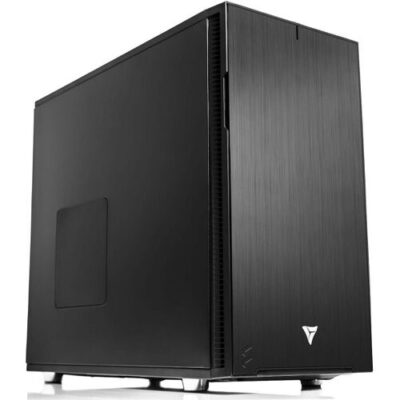
AMD Ryzen Workstation
Built for individual game developers, indie studios, mobile devs, and XR developers. Strong single-core Ryzen 9 9900X performance keeps the Unity Editor and Play Mode responsive. RTX 5060 Ti 16GB delivers HDRP/URP scenes and headset rendering at production framerates without paying for cores you won't use.
CPUAMD Ryzen 9 9900X
GPUNVIDIA GeForce RTX 5060 Ti 16GB
RAM32 GB (2 × 16 GB) DDR5
Best ForIndie game devs, mobile, XR, Unity Editor
Configure your build
Configure →
Studios · Large Projects · Multi-Platform
Threadripper

AMD Threadripper Workstation
Engineered for studios with large Unity projects, automotive/architectural visualization, console game developers, and multi-platform builds. 32 cores accelerate Library imports and parallel platform builds (iOS, Android, console). ECC memory adds production reliability for overnight builds.
CPUAMD Threadripper 9970X
GPUNVIDIA GeForce RTX 5080 16GB
RAM128 GB (4 × 32 GB) DDR5 ECC
Best ForStudios, large projects, parallel builds
Configure your build
Configure →
Component Guidance
Unity scales with project size. Spec the bottleneck.
Unity has split CPU needs (single-core for the Editor, multi-core for Library imports and platform builds), GPU drives Editor and rendering pipeline performance, RAM scales with project size and asset library, and storage performance directly impacts Editor open and reimport time. The build choice depends on whether your bottleneck is Editor responsiveness or build/import time.
CPU Split needs
Single-core for editor · Cores for builds
Unity Editor responsiveness, Play Mode iteration, and gameplay benefit from high single-core clock speed — AMD Ryzen 9 9900X is excellent for individual developers. Library imports, asset reimports, and platform builds (especially IL2CPP for iOS/Android/console) scale with core count — AMD Threadripper 9970X (32 cores) dramatically reduces build times on large Unity projects with multi-platform deployment.
GPU HDRP + URP
NVIDIA RTX · 16GB+ VRAM · DX12
The GPU drives Unity Editor framerate, Scene View navigation, and rendering pipeline performance. NVIDIA GeForce RTX 5080 16GB is excellent for HDRP studio projects, archviz, and console-targeted games. RTX 5060 Ti 16GB is strong for URP-focused work, mobile games, and XR. RTX 5090 32GB delivers the fastest performance for cutting-edge HDRP scenes. 16GB VRAM is the practical floor for production.
RAM Project + Library
32GB indie · 64GB pro · 128GB studio
Unity doesn't publish a RAM minimum, but practical work scales with project size. 32GB DDR5 handles individual workflows, indie projects, mobile games, and XR development. 64GB DDR5 is appropriate for HDRP archviz and console-targeted games. 128GB DDR5 ECC is recommended for large studio projects, automotive/architectural viz, or developers running multiple Editor instances. ECC matters for overnight platform builds.
Storage Library cache
500GB OS · 1-2TB project · NAS archive
Storage has major impact on Unity — projects involve large asset libraries, the Library cache (which can grow to many GB), platform-specific build output, and frequent reimports. Recommended layout: 500GB+ NVMe primary for OS and Unity (multiple Editor versions are common); 1-2TB secondary NVMe for active projects (Assets, Library, builds); HDD or NAS for archives, source control mirrors, and finalized builds. Slow storage directly costs Editor open time.
Performance Tips
Faster Unity. Real-world fixes.
Practical optimizations that move the needle on Unity performance — and how to spot the bottleneck when something's slow.
More cores = faster Library imports
Unity's asset import is multi-threaded. 32 cores on Threadripper 9970X dramatically cuts initial Library import and reimport times on large projects vs. mainstream desktops.
Put Library on dedicated NVMe
The Unity Library cache directly impacts Editor open time and reimport speed. Move it to a fast NVMe SSD — significant win on every Editor launch and asset change.
Enable Asset Pipeline V2 + Accelerator
Unity's Asset Pipeline V2 is faster than V1. Combined with Unity Accelerator on a network share, teams skip redundant imports — once one dev imports an asset, everyone gets it.
NVIDIA RTX for HDRP and XR
HDRP rendering and XR headset output run best on NVIDIA RTX with strong RT cores. RTX 5080 16GB for HDRP studio work; RTX 5060 Ti 16GB for URP, mobile, and most XR development.
ECC RAM for overnight builds
Long IL2CPP builds, asset cooks, and platform builds on non-ECC memory risk silent corruption. Threadripper + DDR5 ECC eliminates this for studio production deployments.
Match RAM to multi-Editor workflows
Studios running multiple Unity Editor instances (one per branch, platform, or feature) need 64-128GB. The Editor itself can use many GB on large projects with HDRP and full asset databases loaded.
Industries Served
Where Unity does the work.
Mobile Games
iOS & Android development
Indie Game Devs
Solo developers & small teams
Console Games
PlayStation, Xbox, Switch builds
VR / XR Studios
Quest, Vive, mixed reality
Automotive Viz
Real-time configurators
Archviz
Real-time architectural walkthroughs
EdTech & Training
Educational & simulation tools
Broadcast & Live
Real-time graphics & events
Unity Workstation FAQ
Unity builds, answered
Common questions on Unity workstation specs, the Editor responsiveness vs build time tradeoff, when to choose Threadripper vs Ryzen, and choosing the right hardware for game dev, mobile, XR, or HDRP work. For Unity's official requirements, see Unity system requirements. More questions? Contact our engineers.
What is a Unity workstation?
A Unity workstation is a desktop computer purpose-built for Unity, the real-time 3D platform behind much of the world's mobile games, indie titles, console games, XR applications, and increasingly film, automotive, and architectural visualization. Unity's hardware demands span the full system: the Unity Editor and Play Mode benefit from strong single-core CPU performance; large project Library imports and platform builds (iOS, Android, console) scale with CPU core count; HDRP and URP rendering pipelines run on the GPU; and project asset libraries, the Library cache, and target platform builds consume substantial storage. A properly configured Unity workstation pairs a multi-core CPU with strong single-core clock, an NVIDIA RTX GPU, ample DDR5 memory, and fast NVMe SSD storage.
What are the hardware requirements for Unity?
Unity's official minimum requirements for the Unity Editor are an x86 or x64 architecture CPU with SSE2 instruction set support, Windows 7 (SP1+), Windows 10, or Windows 11, and a graphics API supporting DX10, DX11, or DX12. These specs confirm Unity will run — they are not what delivers a smooth Unity Editor experience on production projects, fast Library imports, or production-grade real-time 3D performance. For professional Unity work, VRLA Tech recommends Threadripper 9970X with NVIDIA GeForce RTX 5080 16GB and 128GB DDR5 ECC for studios with large projects, or AMD Ryzen 9 9900X with RTX 5060 Ti 16GB and 32GB DDR5 for individual game developers, indie studios, and mobile/XR developers.
What CPU is best for Unity?
Unity has split CPU needs. Unity Editor responsiveness, Play Mode iteration, and gameplay benefit from high single-core clock speed — AMD Ryzen 9 9900X is excellent for individual developers running the Unity Editor, working on C# scripts, and iterating on gameplay. Library imports, asset reimports, and platform builds (especially IL2CPP for iOS, Android, and console) scale with core count — AMD Threadripper 9970X (32 cores) dramatically reduces Library import and build times on large Unity projects. For studios with large Unity projects, frequent platform builds, or running Unity alongside Maya/Blender, the multi-core advantage justifies the Threadripper build.
What GPU is best for Unity?
The GPU drives Unity Editor framerate, Scene View navigation, and rendering pipeline performance (HDRP for high-fidelity 3D, URP for mobile and stylized work, Built-in Render Pipeline for legacy projects). NVIDIA GeForce RTX 5080 16GB is excellent for HDRP studio projects, archviz, and console-targeted games. NVIDIA GeForce RTX 5060 Ti 16GB is strong for URP-focused work, mobile game development, indie 2D/3D titles, and XR development — 16GB VRAM is generous at this tier and handles most Unity scenes well. NVIDIA GeForce RTX 5090 32GB delivers the fastest Editor performance for studios working on cutting-edge HDRP scenes or large-scale real-time 3D.
How much RAM does Unity need?
Unity's published minimum doesn't specify RAM, but practical professional Unity work scales with project size. 32GB DDR5 handles individual developer workflows, indie game projects, mobile games, XR development, and most Unity Editor work. 64GB DDR5 is appropriate for studios working with HDRP archviz, console-targeted games, or running Unity alongside Maya/Blender for asset creation. 128GB DDR5 ECC is recommended for large studio Unity projects with extensive asset libraries, automotive/architectural visualization, or developers running multiple Unity Editor instances. ECC memory is recommended for production studios where overnight platform builds can't risk silent corruption.
Threadripper or Ryzen for Unity?
Both deliver excellent Unity performance — the choice depends on workflow. AMD Threadripper 9970X (32 cores) is the right call for studios with large Unity projects, automotive/architectural visualization teams, developers shipping to multiple platforms (iOS, Android, console builds happen in parallel), and anyone running Unity alongside Maya, Blender, or Substance Painter. ECC memory adds production reliability for overnight builds. AMD Ryzen 9 9900X (12 cores) is the right call for individual game developers, indie studios, mobile game devs, and XR developers — strong single-core performance keeps the Unity Editor and Play Mode snappy at a more accessible price than Threadripper, and 32GB DDR5 handles most indie/mobile project sizes well.
Is Unity good for mobile game development?
Yes — Unity is the dominant platform for mobile game development on iOS and Android. The hardware needs for mobile Unity dev are different from AAA console/PC dev: a fast Editor for rapid iteration, sufficient cores for the IL2CPP and Gradle build chain (which is multi-threaded but not extremely so), enough RAM for the Editor plus an Android emulator or iOS Simulator, and fast NVMe storage for the Library and build cache. The VRLA Tech AMD Ryzen 9 9900X build with RTX 5060 Ti 16GB and 32GB DDR5 is well-matched to mobile game development. Individual mobile devs and indie studios get strong Editor responsiveness without paying for cores they won't use.
Is Unity good for XR and VR development?
Yes — Unity is widely used for VR (Meta Quest, Vive, PSVR), AR (HoloLens, Magic Leap, mobile AR), and mixed reality development. XR development with Unity benefits from strong single-core CPU performance for the Editor, an NVIDIA RTX GPU for headset rendering at high framerates (90 Hz minimum, 120 Hz preferred for comfort), and 32GB+ RAM. The VRLA Tech AMD Ryzen 9 9900X build is appropriate for individual XR developers and most studios. For studios working with high-resolution VR headsets, location-based VR, or simultaneous multi-headset testing, the Threadripper build with RTX 5080 16GB is the better choice.
What storage configuration is best for Unity?
Storage performance has a major impact on Unity workflows — Unity projects involve large asset libraries, the Library cache (which can grow to many GB), platform-specific build output, and frequent reimports. The recommended layout is tiered: a 500GB or larger NVMe primary for OS and the Unity Editor (multiple Editor versions are common), a 1-2TB secondary NVMe SSD dedicated to active projects (the Assets folder, Library, ProjectSettings, and platform builds), and HDD or NAS for archived projects, source control mirrors, and finalized builds. Fast NVMe is especially critical for the Library — slow storage here directly costs Editor open time and reimport speed.
Where can I buy a Unity workstation?
VRLA Tech builds and sells custom Unity workstations hand-assembled in Los Angeles since 2016. Configure and buy a build at vrlatech.com/vrla-tech-workstations/unity. Two configurations cover the workflow range: the VRLA Tech AMD Threadripper Workstation for Unity at vrlatech.com/product/vrla-tech-amd-ryzen-threadripper-workstation-for-unity for studios with large projects, parallel platform builds, and HDRP work; and the VRLA Tech AMD Ryzen Workstation for Unity at vrlatech.com/product/vrla-tech-amd-ryzen-workstation-for-unity for individual game developers, indie studios, mobile and XR developers prioritizing Editor responsiveness. Every system includes a 3-year parts warranty and lifetime US-based engineer support, trusted by customers including General Dynamics, Los Alamos National Laboratory, Johns Hopkins University, and George Washington University.
What is the best computer for Unity in 2026?
The best computer for Unity in 2026 depends on workflow and project scale. For studios with large Unity projects, console/multi-platform game development, automotive or architectural visualization, and developers needing fast platform builds alongside Maya or Blender work, the VRLA Tech AMD Threadripper 9970X build with NVIDIA GeForce RTX 5080 16GB and 128GB DDR5 ECC delivers production-grade performance with ECC memory and 32 cores for parallel builds. For individual developers, indie studios, mobile game devs, and XR developers prioritizing Unity Editor responsiveness, the AMD Ryzen 9 9900X build with RTX 5060 Ti 16GB and 32GB DDR5 provides strong single-thread performance for Editor smoothness at a more accessible price. Configure at vrlatech.com/vrla-tech-workstations/unity.
What warranty comes with a VRLA Tech Unity workstation?
Every VRLA Tech Unity workstation includes a 3-year parts warranty and lifetime US-based engineer support at no extra cost. Each system is hand-assembled in Los Angeles, burn-in tested under sustained Unity compile and rendering workloads, and shipped ready to run the Unity Editor with HDRP, URP, and standard plug-ins out of the box. Replacement parts ship under warranty with direct engineer access via phone and email — engineers specialize in real-time 3D production and game development workflows, not general IT. Buy a build at vrlatech.com/vrla-tech-workstations/unity.
1 / 4
Custom-built. Burn-in tested. Shipped ready.Tell us about your
Tell us about your
Unity project.
Mobile game, console, indie title, XR, or HDRP archviz. Project size, target platforms, render pipeline (HDRP / URP / Built-in), multi-app pipeline. We'll spec the right hardware and quote the build.



